

Quick Summary: Tally on Cloud is completely worth investing in for most CAs, as it lets you manage multiple client Tally on Cloud files from anywhere, work with your team, and keep all your data backed up and secure. You remove expensive server maintenance and the stress of manual backups.
If you’re a CA or accountant, you’ve probably heard of Tally on Cloud.
But is it really worth your money and time? That is the question many professionals are asking in the coming times.
Tally on Cloud runs Tally Prime on a remote server, so you don’t need Tally Prime software and can access it from anywhere using any device, like your mobile, laptop, or computer.
It’s an amazing option for CAs and accountants managing multiple clients or working from different locations.
But switching to cloud-based accounting software is a big decision.
You need to consider costs with ease of use as per your workflow.
This guide will help you. It will break down everything you need to know about Tally on cloud. We’ll explore its problems, pricing, and benefits to inform your decision.
Let’s begin.
- The Short Answer: Is It Worth It for CAs?
- The Problems CAs & Accountants Face With Desktop Tally
- Key Benefits of Tally on Cloud for CAs & Accountants
- Tally on Cloud for a Single CA Vs a CA Firm
- How Much Does a CA Cost? (Is the ROI Worth It?)
- Are There Any Tally on Cloud Downsides for CAs? (Honest Look)
- What to Look for in a Tally Cloud Provider (CA Checklist)
- How CAs Can Get Started With Tally on Cloud
- Frequently Asked Questions:
- Conclusion: Should CAs & Accountants Switch to Tally on Cloud?
The Short Answer: Is It Worth It for CAs?
Yes, Tally on Cloud is worth it for most CAs.
Tally on Cloud offers good benefits for those who manage multiple clients, handling all your clients from one place and accessing all your work from home or anywhere. You don’t need to buy expensive servers for this.
Multiple team members can work simultaneously on the same data without conflicts. Automated compliance easily handles GST and tax calculations instantly.
You get enterprise security like disaster recovery and automatic backups. These features help CAs scale their practice without expensive IT costs and ensure your clients’ data safety and compliance with regulatory requirements.
The Problems CAs & Accountants Face With Desktop Tally
Desktop Tally has been used by accountants for years, but it comes with real challenges. As your practice grows and your work becomes more flexible, these problems become bigger headaches for you.
Let’s look at the main issues that make many CAs switch to cloud solutions.
Managing Multiple Client Files on One Machine
No Access Outside the Office
Data Loss & Backup Headaches
Sharing Data With Clients & Team Members
After all of these valid reasons, it becomes quite valid why many CAs are moving away from desktop Tally to cloud-based solutions that solve all these problems at once.
Key Benefits of Tally on Cloud for CAs & Accountants
Tally on Cloud solves the problems that desktop Tally creates. It is designed to make your accounting work easier and faster, with security.
Instead of staying stuck at your desk with old software, you get a modern and flexible solution that fits how accountants work today.
Here are some of the main benefits that make CAs switch to the cloud solution.
Access All Client Files From Anywhere
Work on Multiple Companies Simultaneously
Real-Time Collaboration With Your Team & Clients
Automated Backups for Every Client’s Data
Secure, Encrypted Access to Sensitive Financial Data
All these benefits make it very easy to understand how Tally on Cloud is very useful for CAs and accountants.
Easier GST Filing & Audit Season Workflows
Tax rules and GST updates happen automatically; you don’t have to manually update your software or worry about using old tax rules by mistake.
During your busy audit season (your busiest and most stressful time), your team can collaborate more easily and work faster together.
One person prepares financials while another can gather audit documents, with everything done in real time. Reports can be easily generated and shared instantly with clients and auditors in place of waiting days for manual preparation.
All of these benefits work together to change how you do accounting. Instead of wasting time managing files and worrying about data loss while struggling with teamwork, you can actually focus on what really matters.
Tally on Cloud for a Single CA Vs a CA Firm
Tally on Cloud works completely differently if you are a solo practitioner or you have a firm that is running with a team. The benefits, cost, and best features vary completely based on your practice size.
For solo practitioners, the question is if the monthly subscription cost makes sense for one person or not, while for a firm with a team, the real power of Tally on Cloud comes from features that help people work together.
This is the reason why some of the CAs love Tally on Cloud while others think it’s very expensive.
Here, let’s see which of the options actually makes sense for your practice.
Solo Practitioners & Freelance Accountants
If you’re working as a solo CA, you work alone, handling your own clients without a team. Tally on Cloud is useful for CAs, as it gives you important benefits like accessing files from anywhere, with automatic daily backups that always protect your data.
You can work from your client’s home, cafe, or any place, and everything is available instantly. Automatic tax updates mean you never miss new GST rules or compliance changes.
When you have a busy audit season, you can visit client locations and still access everything you need, with zero need to carry your files everywhere.
Multi-User CA Firms & Teams
Every type of CA firm with multiple team members uses Tally on Cloud. You get smart teamwork features that save you time and frustration. Multiple people can work on the same account simultaneously. One person can enter invoices while another can prepare for GST returns.
When you have peak season, your team works much faster. Your team works from different locations, like an office or your home, staying connected for 24 hours in real time.
The monthly cost also becomes affordable when you have a team, since it is split among your team. You can even add new members to your Tally when your work becomes bigger.
In short, just know that solo CAs would need to calculate if the monthly cost is worth the convenience and peace of mind, whereas for CA firms with teams, Tally on Cloud almost always pays for itself through faster work and better collaboration.
How Much Does a CA Cost? (Is the ROI Worth It?)
Many accounting practices think about hiring more and more CAs to handle their growing workload.
But let us tell you honestly before you do: understand the real cost. If you hire a full-time CA, it is expensive, as it is much more expensive than you might think.
Beyond their salary, you pay their commission, benefits, and allowances. Most practices don’t even realize how much this can cost you every month.
True cost of hiring a CA
When you hire a full-time chartered accountant, the monthly cost is far more than just your salary.
A CA gets paid around $50,000-$100,000 or more per month, depending on experience, location, and responsibilities.
In addition to their salary, you may also need to pay for:
These additional costs can significantly increase the monthly expense of hiring any CA.
If we compare, cloud-based accounting software like Tally on Cloud can offer access to accounting tools for a much lower monthly cost. Plans may start around 399 rupees per month, while advanced plans can cost more depending on the number of users and features.
Technology can scale faster than people. Adding one new user on Tally on cloud takes minutes, whereas hiring a new CA takes weeks and creates ongoing salary costs forever.
Are There Any Tally on Cloud Downsides for CAs? (Honest Look)
Tally on cloud is not perfect. Every software has downsides, and it is very important to understand everything before investing.
We’ve talked about benefits, but now let’s talk about the problems.
Cloud accounting is not for everyone, and some CAs face real challenges. So it’s better that you understand these downsides so it can help you make a smart decision.
Internet Dependency
Choosing a Reliable Provider
Client Data Responsibility
These were some of the real downsides. So before switching to Tally on the cloud, carefully take these downsides into account and ensure you connect to a reliable provider with strong security practices in one place.
What to Look for in a Tally Cloud Provider (CA Checklist)
There are certain factors you need to look at when you’re looking for your Tally cloud provider; some offer basic services while others offer complete and reliable solutions.
The provider you choose will have your client data and impact your business reputation.
If you make the wrong choice, it can create problems, so let’s look at a practical checklist to help you identify the right factors.
Daily Automated Backups
Your data must be backed up automatically every single day. Always confirm this with your provider: Do you get daily backups or not, and where are all the backups saved? Your provider should have multiple backup copies in different locations, so if one fails, you still have copies.
Make sure all the backups happen automatically and don’t require any of your manual involvement. Ask your provider about their backup retention policy also, like do they keep backups for 30 days or 90 days or even longer?
This matters because if you discover a problem weeks later, then only a good provider will back up your data automatically and restore it in minutes.
Multi-User & Multi-Company Support
Your team must work simultaneously on the same accounts without facing any conflicts. The provider should easily remove users as your team starts growing. First, you need to check for multi-user support.
You need Tally Prime (Multi-user) on the server, and if you access Tally over RDP, then you must have Tally Virtual User (TVU) packs as per Tally’s rules.
Important Note: Make sure there are zero artificial limits on the number of company files, since TallyPrime supports unlimited companies under one installation.
Check if it tracks who has changed what and at what time; it is very important for audits. Verify that different users work from different locations, like client sites, offices, or your home, smoothly.
Data Security & Confidentiality
Your client’s financial information must stay completely protected from possible hackers. This is not just a business choice, but it’s your legal and professional obligation under the ICAI Code of Ethics.
The ICAI’s Professional Ethics and Security section clearly states that CAs must maintain strict confidentiality of client data. You are personally liable if client information leaks.
The client relationship is built on trust, and breaching confidentiality destroys that trust and your reputation forever. Confidentiality is completely non-negotiable for CA practices; it’s your professional duty to clients.
Reliable Uptime & Support
Your Tally cloud for accounting firms must work consistently and not face frequent downtime. You can check the track record with other CAs, such as the provider’s past outages.
Ask your provider: What’s the uptime guarantee, 99.9% or 99.99%? What are your ticket tracking procedures until it is resolved?
Response time is very critical if you need support immediately and not on the next business day. Verify 24/7 support availability through phone, email, or if they have tickets. Maintenance should happen during off-hours and not at busy times.
CAs should prefer choosing a 99.99% uptime guarantee, which means the service will be down only for 52 minutes per year. Your Tally on Cloud is accessible and working 99.99% of the time. This is the minimum standard CAs should accept for their accounting software.
Anything below this uptime should be avoided, because if a provider offers 99.9% uptime, that means downtime of 8.7 hours per year. That’s almost a full workday every year when you can’t access client data, so during your audit season, even 1 hour of downtime can be a disaster.
So, before you choose your cloud provider, check for at least these options using this checklist. Don’t just go for the cheapest; you can ask for references from other CAs already using their service.
Use their free trial to test everything before investing. If you have the right cloud provider, it becomes a partner for protecting your practice, reputation, and clients’ trust in your data-handling capabilities.
How CAs Can Get Started With Tally on Cloud
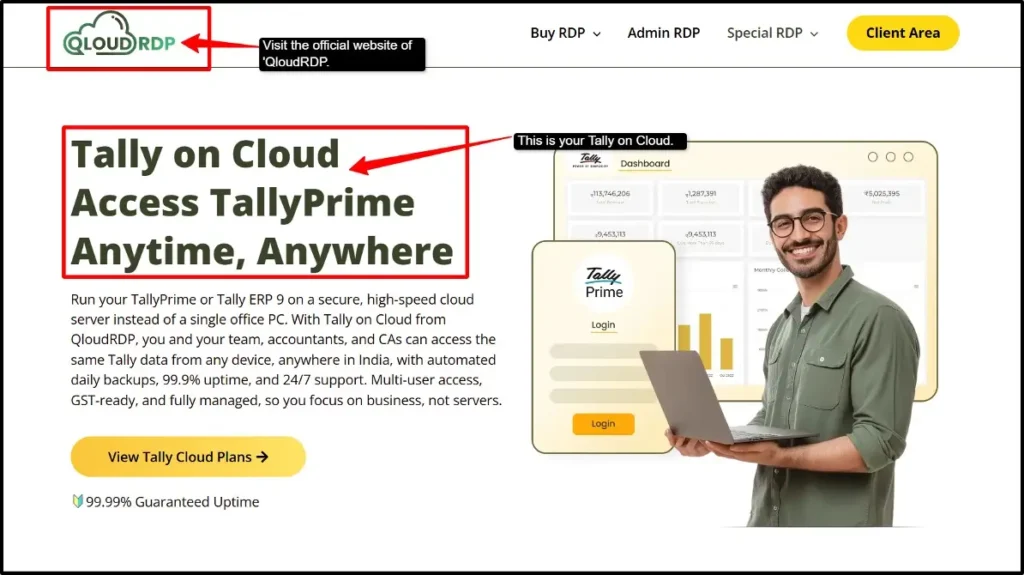
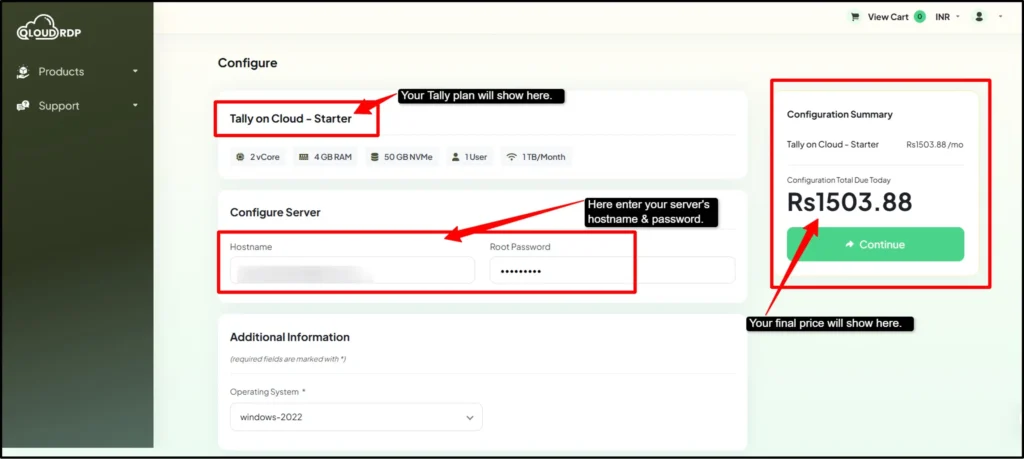
Moving to Tally on Cloud for every CA is easier than you can think. Most CAs are worried about losing their data or disrupting their practice, but QloudRDP is a provider that can handle migration smoothly.
Getting started will only take a few minutes. Here are some of the easiest steps that you can follow to start with Tally on Cloud.

Note:
qloudrdp does not include a Tally License with its hostings plans. You need to have your own valid Tally License or purchase one separately
if you already have a Tally License, you can use it on the cloud, as long as you follow Tally’s license rules.
Once you make the purchase, keep your cloud login details secure, and change passwords every 3 months.
Report any issues to support immediately.
You can even watch tutorials if your provider has them for the setup process. Update your user list when team members join or leave and review security settings monthly to ensure everything is properly configured.
Frequently Asked Questions:
Is Tally on Cloud good for chartered accountants?
Yes, it’s excellent for CAs managing multiple clients or teams. It saves time, allows remote access, and enables better teamwork.
Can I manage multiple clients’ Tally data on the cloud?
Yes, definitely. You can easily manage unlimited client companies in one cloud account. Each client’s data stays separate, and you can switch between clients instantly, and there will be zero confusion or manual file management.
Is client financial data safe on the Tally Cloud?
Yes, if you choose a reliable provider with good security measures and daily backups. Your data is much safer on cloud servers than on office computers.
Can my whole CA firm access Tally at the same time?
Yes, unlimited team members can access it simultaneously. Multiple people can work on the same account together, and you can even set permissions.
Can clients and my team work on the same file together?
Yes, your team and clients can work on the same file together. Most of the providers allow clients to view their data through a client portal, but data entry remains with your CA firm only.
Conclusion: Should CAs & Accountants Switch to Tally on Cloud?
After exploring all aspects of Tally on cloud, like its benefits, costs, and challenges, you can have a clear verdict that cloud accounting is the future for most of the accounting practices.
This guide has shown that Tally on Cloud solves most of the important problems that Desktop Tally can create, like file management, client data loss, and collaboration headaches.
For every CA firm with teams, the investment pays for itself, and even solo CAs can get major value through automation and remote accessibility.
The downsides also exist, but these are manageable if you choose a reliable provider.
Take the step to cloud accounting, and then your practice, your team, and even your clients will thank you. The future is going to be cloud-based, so make the smart move today.
💡 Most Loved Article!








Leave a comment