

Quick Summary: Businesses are moving Tally to the cloud for remote access, automatic backups, and flexibility in their business operations. Companies can work from anywhere without relying on one office computer. This guide covers the benefits, limitations, and setup steps so you can host your Tally securely.
Are you still managing your business finances the old way?
Today, thousands of businesses are making the switch to Tally on Cloud, and for good reason.
Tally on Cloud is an online version of the popular accounting software Tally that helps businesses to keep track of their money, invoices, and financial reports. Instead of installing software on your computer, everything works from the internet, meaning you can access it from anywhere and anytime.
Businesses are switching to it for convenience, safety, and speed. If you use Tally on the cloud, you don’t need to worry about backing up your data, updating software, or facing any of the technical problems.
Your information is secure in the cloud; your team can work together from different locations, and you get real-time updates of your business finances.
If you switch to Tally on Cloud, it can save you time, reduce your costs, and help you make better business decisions.
- Why Are Businesses Switching to Tally on Cloud in 2026?
- 10 Key Tally On Cloud Benefits
- Tally on Cloud vs. Traditional Desktop Tally (Quick Comparison)
- Who Benefits Most From Tally on Cloud?
- Are There Any Drawbacks to Tally on Cloud? (Honest Look)
- Is Switching to Tally on Cloud Worth It in 2026?
- How to Switch Your Tally to the Cloud
- Frequently Asked Questions (FAQ)
- Conclusion: Why 2026 Is the Year to Move Tally on Cloud
Why Are Businesses Switching to Tally on Cloud in 2026?
This shift towards cloud-based accounting solutions has become impossible to ignore in 2026.
Businesses across industries, from small retailers to manufacturing companies, are all moving away from traditional ways of desktop accounting software and embracing Tally on Cloud.
Let’s see the reasons:
If you switch to Tally on Cloud, you’re future-proofing your operations, lowering operational costs, and reducing IT burden.
You get enhanced security with instant access to financial data, combined to create a compelling case.
10 Key Tally On Cloud Benefits
Cloud-based solutions are not considered a luxury anymore, but they are becoming a necessity. Tally on Cloud has emerged as something that makes your business operations easy and secure.
Below are the top 10 key benefits that are forcing the mass population towards new ways of accounting.
1. Access Your Accounts From Anywhere, Any Device
Now you don’t need to be at your office to access your accounting software. Using Tally on Cloud, your financial data is always available wherever you are.
It does not matter either your team is in the office or you are travelling; you can log into your Tally on Cloud from any device. Your accounts are just a login away, and they’re there 24/7. You get cloud details with secure access and can reach your data through any device, laptop, tablet, or your phone.
This level of accessibility not only improves employee productivity, but it also ensures that your critical financial decisions do not require you to return to your office. So, your business never sleeps.
2. Real-Time Multi-User & Multi-Branch Collaboration
Multiple authorized users can work on the same centrally hosted Tally data at the same time, but they can work as long as the Tally license supports it.
Your license determines everything, like if you’re using a single-user or multi-user setup. Branches can also share updated information without waiting for the files to be transferred manually.
All users work with a centralized database, so there is less need to copy files between branches. This helps reduce duplicated work and keeps everyone working with current data; for example, your sales team can enter invoices while the accountant checks payment from another location.
Cloud access is especially helpful for businesses with offices, warehouses, and sales teams in different locations. Your Delhi office, Mumbai warehouse, and Bangalore retail store can all share the same accounting data in real time.
3. Automated Daily Backups & Data Protection
Cloud providers can schedule automatic backups of your Tally data. This reduces the risk of losing important records because of accidental deletion or file corruption.
It is important to note that automatic backups are typically offered by managed cloud providers. You should confirm this with your Tally on Cloud team. Like, do they offer automatic backup as part of their service or not?
Your Tally data in the cloud stays secure and backed up at all times with advanced data protection and dependable cloud-based recovery.
Backups of Tally data in cloud services are performed automatically at set times, reducing the risk of data loss. Data entered into Tally is synchronized in real time across all devices, ensuring consistency and up-to-date information.
4. Lower Costs than On-Premise Servers
A local server requires an initial investment in hardware, storage, and networking equipment, power, and maintenance. It may also need replacement or upgrades as your business grows.
Tally on Cloud changes many of these costs into a regular monthly subscription. But if you go for the on-premises server costing, it could lead to several costs like:
| Factors | Costing |
|---|---|
| Server purchase and replacement | 50,000-200,000; replacement every 5 years. |
| Electricity and Cooling | 5,000-15,000 monthly |
| Hardware repairs | 2,000-10,000 per incident. |
| Local storage systems | 30,000-150,000 upfront + upgrades. |
| Server Monitoring | 3,000-8,000 monthly |
| IT Maintenance | 10,000-20,000 monthly |
| Total estimated cost | 400,000-700,000. |
Based on this table, businesses can expect to save 30-50% annually by migrating from on-premise servers to Tally Cloud.
Tally on Cloud will offer the same functionality for a much lower price every year. This final cost depends on your number of users, server response requirements, and storage needs.
5. Business Continuity (No Dependency on One PC)
If Tally is installed only on one office computer, a computer failure can easily interrupt your accounting work.
A damaged hard disk, power problem, operating system error, or virus infection may prevent access to your records.
This supports business continuity during:
So if you have Tally on the cloud, the main application and data remain on the cloud server only. Users can connect from another authorized computer if the office PC is unavailable.
6. Bank-Grade Security & Encryption
Professional cloud providers use multiple security layers to protect hosted applications and business data.
These may even include encrypted connections, firewalls, and antivirus protection with recent security updates and server monitoring.
Some Tally cloud environments also use additional login controls such as secure PINs or two-factor authentication.
You can further improve your security by: Creating separate accounts for each user. Using strong and unique passwords. Enabling multi-factor authentication. Reviewing login activity regularly.
“Bank-grade security” is a marketing term unless the provider explains the actual controls. You should ask for clear information about encryption, backups, monitoring, access policies and data center security.
7. Easy Scalability as Your Business Grows
Your business may begin with only a few users and later require more employees, branches, transactions, storage, or even processing power.
The benefits of Tally on cloud hosting allow you to upgrade resources without even purchasing a completely new physical server.
You may be able to add users, increase RAM, and select a stronger processor through the provider’s control panel.
For all of these issues, you need to ask your provider how upgrades are handled and if your server requires a restart or data migration.
8. Works on Mac, Windows, Android & iOS.
Tally on Cloud is designed to offer seamless access across all your devices and operating systems. It does not matter if you’re using Windows or Mac desktops or if you’re accessing it from Android and iOS. Tally on Cloud ensures consistent functionality and real-time data synchronization.
Secure Access via SSH:
You can access Tally Cloud securely using an SSH client by providing:
This ensures secure remote access from anywhere, and your data stays encrypted during transmission. It is safe to say that Tally on Cloud supports multiple devices and operating systems.
9. Faster Performance With NVMe Cloud Servers
NVMe storage is faster than traditional mechanical hard drives and can help the server read and write data more quickly.
This may help you to improve tasks such as
Although NVMe storage alone does not guarantee fast Tally performance.
Speed also depends on CPU, RAM, network quality, server location, and the size of your company data. It also depends on the number of users that are connected at the same time.
10. Reduced IT Burden & Maintenance
Managing a local server requires regular updates, hardware checks, and security protection. It even requires backup management with troubleshooting and replacement planning.
When you have Tally on the cloud, your hosting provider generally manages the underlying server infrastructure. Your team can very well focus on accounting and business operations instead of handling server maintenance.
The exact services differ between providers. So always check the maintenance and data recovery for any of the providers. Your plan should include security monitoring and software updates, or they should be charged separately.
Tally on Cloud vs. Traditional Desktop Tally (Quick Comparison)
Tally is commonly used in two ways: as a traditional desktop application installed on an office computer or as a cloud-hosted solution accessed through the internet.
Traditional Desktop Tally can work well for a single office or a small team, while Tally on Cloud is designed for businesses that need remote access with centralized data.
Let’s refer to the table given below and understand the difference better.
| Aspects | Tally on Cloud | Traditional Desktop Tally |
|---|---|---|
| Access | Access Tally from different locations using an internet connection. | Usually accessed from the computer where Tally is installed or from computers connected to the same network. |
| Collaboration | Users from different branches or locations can easily work with the same centrally hosted data. | Collaboration is limited to the office network. |
| Backup | Managed cloud providers may provide scheduled or automatic backups with recovery options. | Backups are usually managed by the business through local drives and external disks. |
| Cost | Requires a recurring hosting or subscription fee but reduces the need to buy & maintain a local server. | May have lower recurring hosting costs, but the business must pay for computers. |
| Security | The provider manages encrypted connections and security updates. | Security depends mainly on the office network and local backups. |
| Scalability | Users, storage, RAM, CPU, and server capacity can usually be upgraded as your business grows. | Expansion may require new computers, a stronger local server with additional maintenance. |
Traditional desktop Tally remains a practical choice for businesses that work from one office, have a small team, and prefer to manage their own computers and backups.
Tally on Cloud is usually more suitable for businesses with remote employees, multiple branches, and remote employees who require centralized access with easier scalability.
Your choice should be based on your actual requirements. Compare all the necessary factors first before moving your accounting data to the cloud.
Who Benefits Most From Tally on Cloud?
Tally on Cloud is especially useful for businesses that need to access accounting data from different locations and manage several branches.
Instead of depending on the one office computer, authorized users can access Tally remotely through a supported cloud service, browser, or client application.
This can support accounting, invoicing, GST work, and inventory management. Here are the types of users that get the most benefit from Tally on the cloud.
Chartered Accountants & CA Firms
Tally on Cloud is a complete advantage for chartered accountants and CA firms. CAs can file GST returns directly from Tally Cloud rather than through manual data exports or spreadsheets. You can easily generate your GST reports on the go and submit your returns instantly.
You can conduct audits seamlessly, and you get instant access to reports, balance statements, and detailed audit schedules. Everything is available in real-time, removing the need to wait for clients to provide data or copies.
SMEs & Startups
Small and growing businesses can access Tally from anywhere without investing in servers, office hardware, or any kind of dedicated IT support. Teams can easily work remotely, collaborating in real time and scaling users or storage as the business grows.
Business owners and employees can access accounts, GST records, and invoices from anywhere using an internet-connected device. Cloud providers typically manage maintenance, backups, and all the important updates.
Multi-Branch & Retail Business
Tally on Cloud is highly useful for multi-branch and retail businesses that need centralized control over sales, billing, and stocks. Every branch can access and update the same live data, helping all the managers to track performance without waiting for manual reports.
Retail owners can monitor inventory levels, sales trends, and stock movement with easy cash flow across outlets from one place. This helps in reducing data duplication, improving accuracy, and helping to prevent delays in your decision-making.
Manufacturing & Trading Companies
Manufacturing and trading companies benefit from Tally on Cloud because it brings accounting, inventory with purchasing and sales, and all data together.
Manufacturers can track raw materials, production expenses, and stock levels efficiently. Trading companies can manage purchase orders, sales, and payables from a central platform.
You get real-time reports that help you and your team understand costing and identify trends while making faster decisions. Different teams can access the same updated information, improving your coordination and reporting.
Tally on cloud is a perfect solution for SMEs, startups and all of these users. It offers anytime access, centralized data, and smooth collaboration. You get better control with secure backups. You reduce your IT costs, and your accounting management simplifies.
Are There Any Drawbacks to Tally on Cloud? (Honest Look)
Tally on Cloud does offer convenient remote access and centralized data with easier collaboration, but it is still not perfect for every business.
The main concerns are dependence on the internet, selecting a trustworthy provider, and planning the move from desktop Tally carefully.
Tally on Cloud requires a stable internet connection to access the hosted application. If your internet stops working, users may not be able to open Tally or work normally until the connection is restored.
Tally’s remote access guidance recommends broadband connectivity, with the required speed depending on the amount of data being transferred and the number of users.
Businesses should keep a backup internet connection, such as a second broadband line or a reliable 4G/5G connection.
The cloud provider has an important role in performance, security, and backup, along with technical support.
A low-cost plan may not offer enough CPU, RAM, storage, or user capacity to support your business. Before choosing your provider, confirm if the service is managed (if it is managed, you get automatic updates with backups) or if it is unmanaged, in which case you handle maintenance yourself.
Ask these some important questions too:
Always ask for clear information about how your data is protected and how it can be recovered if the service has a technical problem.
Moving from Desktop Tally to the cloud should be planned carefully. Your business must identify the correct company data folder, create verified backups, and check the Tally version. Always test the migrated data before starting your regular work.
Tally always recommends a backup before migration and checks that the company data is accurate and reliable. Migration may also require short downtime, especially when the latest data is being transferred, and users are asked to stop entering transactions.
The best approach is to choose a reliable provider that uses strong access controls. If you have proper planning, the benefits of Tally on the cloud can easily remove all the limitations for growing and multi-local businesses.
Is Switching to Tally on Cloud Worth It in 2026?
Yes, for many businesses, switching to Tally on Cloud is worth considering, especially when employees work from different locations or multiple branches that need to share data.
But moving to the cloud is not automatically the best choice for every business. The decision depends on your team size, number of branches, and internet reliability.
Tally on Cloud may be a good choice if your business:
So, this switch is definitely worth your consideration. If gives you easier access with centralized working. You get automatic encrypted backup with much simpler management infrastructure.
So, this switch is definitely worth your consideration. It offers you easier access, centralized working, and automatic encrypted backup with simpler infrastructure management.
How to Switch Your Tally to the Cloud
Moving Tally from your local computer to the cloud can be simple when it is planned correctly. If you currently use Tally on your local PC, first create a complete and verified backup of your company data.
After that, you can visit QloudRDP for Tally on cloud setup and support with simple and easy steps.
Here are the brief steps you can follow to run your Tally on the cloud.
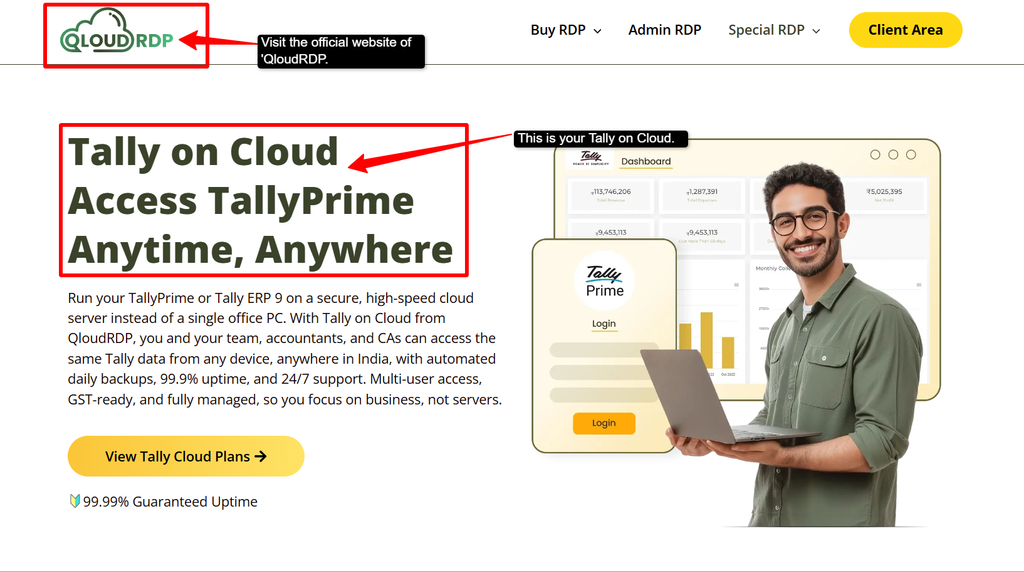
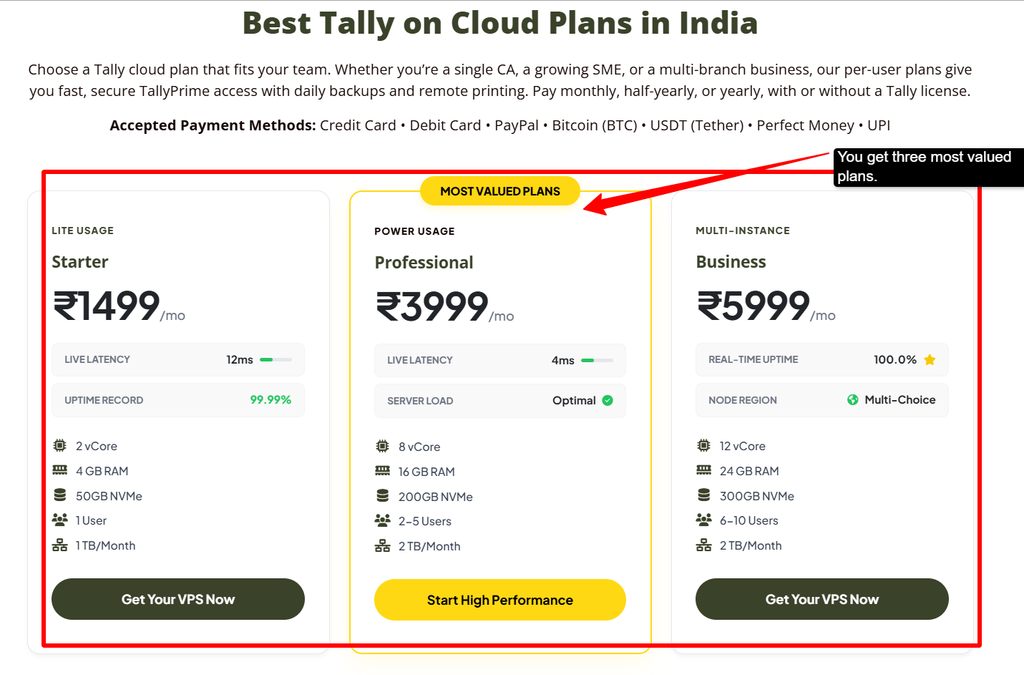
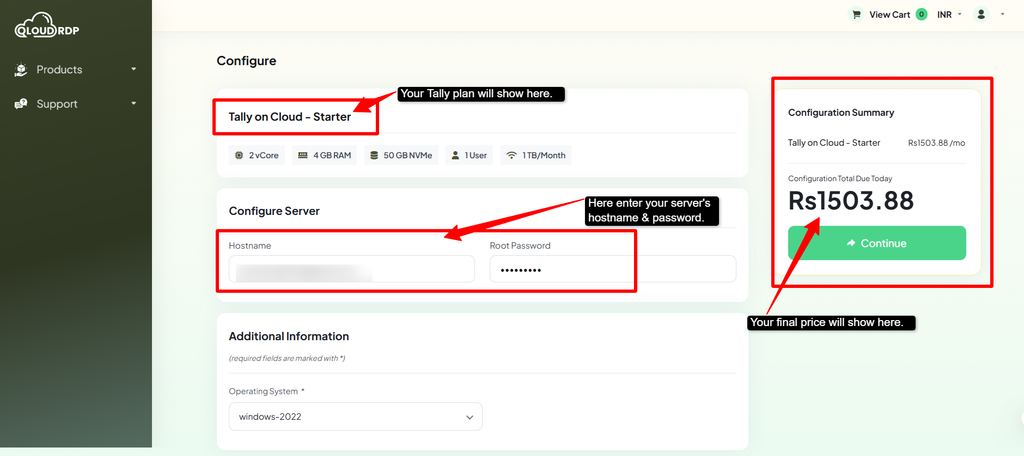
Note: If you already have a valid Tally license, it’s fine; otherwise, it’s optional thay you can even purchase it from QloudRDP.
Your existing Tally license key can then be used according to the license terms, allowing you to run Tally in the cloud as required.
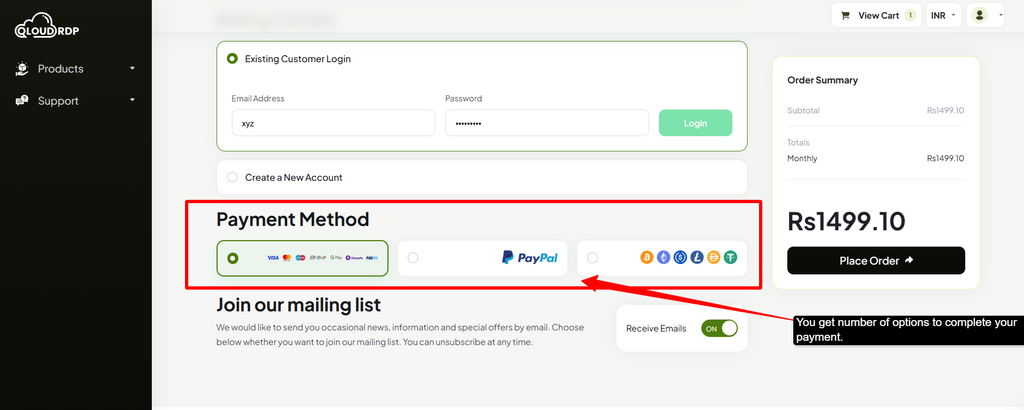
After payment, you’ll receive your login credentials from QloudRDP. Keep these details private, and do not share administrator credentials with every user. Upload the backup to your cloud server and restore it in Tally.
If you already have a valid TallyPrime license, you can easily use it on Tally Cloud. But you’ll need to check with Tally and your hosting provider to confirm your existing license and virtual user configuration. Different licenses have different terms, so it’s always worth verifying.
If you don’t have a Tally license yet, you may need to purchase one separately depending on your setup. Once you have the license, you’ll receive your login credentials from your cloud provider; keep these details secure.
Frequently Asked Questions (FAQ)
Is Tally on Cloud better than desktop Tally?
Yes, Tally on Cloud is a better choice than desktop Tally. You can access your accounting data from any device and location, while your team can work on the same data at the same time with better access control and management.
Does Tally on Cloud save money?
Yes, it saves money on server maintenance, IT staff, upgrades, and infrastructure. You even get some hidden savings like reduced downtime with automatic backups. There is zero hardware replacement cost with Tally on Cloud.
Is Tally on Cloud safe for financial data?
Yes, you get enterprise-grade encryption, compliance with security updates, and many more things. There are regular audits with automated backups, and your business operations can continue continuously with monitoring to ensure your data safety.
Can small businesses benefit from Tally on Cloud?
Yes, for small businesses, zero server investment is required, and it scales well with growth, enabling remote work and lower operational costs. It offers you enterprise-level security.
Do I need a good internet connection for Tally on Cloud?
Yes, a minimum of 1-2 Mbps for single users, and you require more than 10 Mbps for multiple concurrent users.
Conclusion: Why 2026 Is the Year to Move Tally on Cloud
Businesses in the coming year need to make the right switch to moving to Tally on the cloud because accounting is no longer limited to one office computer.
Teams now work from different places, and branches require faster access to shared financial and inventory data.
It adds a cloud layer to the existing Tally environment, allowing all of your authorized users to access company data through a browser or supported client from different locations.
Before moving, choose a trusted provider, confirm their backup policies, and plan your migration properly.
There are many companies that need reliable remote access to Tally, and services such as QloudRDP can be considered as one possible option for you.
Choose Tally on the cloud and contribute to the growth of your business.
💡 Most Loved Article!






Leave a comment