

Can you handle or manage it all on your own?? I guess not. It is quite tough for you to manage it all manually in this fast-growing world, where technological advancements are rapidly replacing much of human work.
Does n8n run all of this magically on its own??
Think of n8n as the brain of automation, and hosting is like the home that will keep it running 24/7. Automation is becoming the backbone of many businesses, not just in many IT sectors, but also among entrepreneurs and developers.
To get the most out of an automation tool like n8n, you need a hosting environment that is fast, reliable, and accessible 24/7. Choosing the right provider can be the difference between a workflow that lags and one that executes in milliseconds.
To help you find the perfect home for your automations, we’ve rounded up the 7 best n8n hosting providers for 2026. By self-hosting on these platforms, you can enjoy total data privacy and unlimited executions free from the constraints of standard cloud plans.
- TL;DR: Quick Decision Guide on n8n Hosting Provider
- What is n8n?
- Ways to host n8n
- 7 Best n8n Hosting Providers: An In-Depth Review
- 1. Hostinger
- Hostinger Performance at a Glance
- 2. DigitalOcean
- DigitalOcean Performance at a Glance
- 3. XCloud
- xCloud Performance at a Glance
- 4. Cloudminister
- Cloudminister Performance at a Glance
- 5. Kamatera
- Kamatera Performance at a Glance
- 6. Rosehosting
- RoseHosting Performance at a Glance
- 7. Hetzner
- Hetzner Performance at a Glance
- The Great Migration to Self-Hosted n8n
- The 2026 Profitability Equation: n8n Cloud vs. Self-Hosting
- The 2026 Hardware Blueprint—What n8n Actually Needs to Run
- Step-by-Step: How to setup n8n on your VPS
- Advanced n8n Configuration: Performance Tuning for High-Scale Automation
- Conclusion & Future Outlook
- Frequently Asked Questions
TL;DR: Quick Decision Guide on n8n Hosting Provider
| Provider | Strategic Fit | Starting Price | Key Superpower |
|---|---|---|---|
| Hetzner | Efficient & Cheap | $3.15 | Best price-to-performance ratio. |
| Kamatera | Fully Custom | $4.00 | 30-day free trial to experiment. |
| DigitalOcean | Modern & Scalable | $6.00 | Huge community & easy scaling. |
| Hostinger | AI-Enhanced | $6.48 | AI management for easy setup. |
| Cloudminister | Local Support | $14.94 | Great for India-based projects. |
| Rosehosting | Fully Managed | $43.99 | 100% uptime or they pay you back. |
| XCloud | Dashboard King | Free Tier | Manage multiple clouds in one spot. |
What is n8n?
n8n is a workflow automation tool that helps you connect to various running apps and automate tasks without requiring your involvement. It’s like automating your task the way a human would.
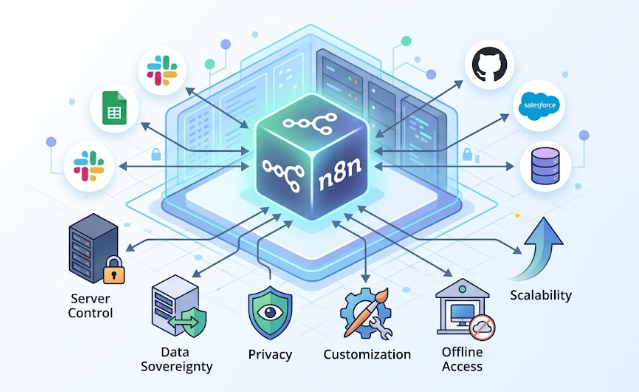
Working with n8n, you can easily and automatically send emails wherever a form is filled. You can easily save your data from Google Forms to different spreadsheets. Get fast alerts on WhatsApp and connect to different apps like Gmail, Notion, and Telegram.
Ways to host n8n
N8n is just an automation tool, but hosting keeps it running. Without reliable hosting, n8n runs like a machine that only works when your laptop is on. But with hosting, it becomes a 24/7 automation engine.
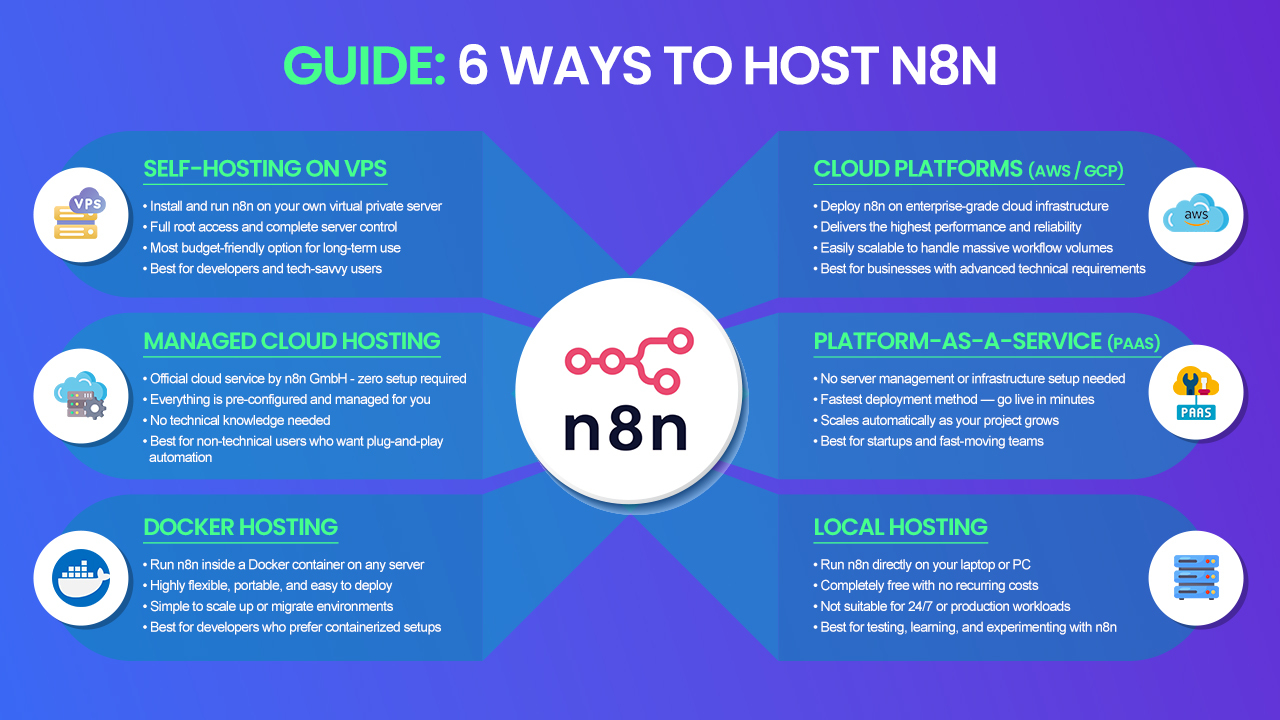
There are some simple steps that you can follow to host n8n, like
- Self-Hosting on VPS: As the name suggests, you self-host on a virtual private server (VPS), then install n8n. It gives you full control and is budget-friendly.
- Managed Cloud Hosting: This is the easiest method, where you use the official cloud by n8n GmbH. It requires no setup, and everything is easily managed. It is the best choice for users who are not into technical use on a daily basis.
- Docker Hosting: It is a modern approach towards ways of n8n and is known as n8n Docker hosting. Here, you run the n8n inside the Docker server; it is flexible and scalable with easy deployment.
- Cloud platforms: An advanced and scalable method to host n8n, you can deploy on Amazon Web Services or on the Google Cloud, delivering high performance and easy scaling.
- Platform-as-a-Service (PaaS): Using the PaaS way, the deployment becomes very easy with no requirement for a server. It has a very quick and easy setup and is considered best for startups and quickly growing projects.
- Local Hosting: Local hosting means running the n8n on your laptop; it is free and good for learning purposes. It is best used for testing and for practicing.
Why is n8n hosting “special”?
If you work in the technical field and need hosting options repeatedly, and you also use tools like n8n, we will explain why n8n hosting is special.
- It is very different from standard websites: users visit them occasionally, whereas n8n runs continuously in the background. Your workflow can be active at any time, so n8n hosting should always be on and reliable.
- The n8n hosting is unique because it continuously receives data from multiple apps and can easily send requests to other services.
- The n8n tool executes the workflow and processes data so that the hosting provider will support all background jobs and long-running processes.
- Performance must be very good, as it will affect the automation. If hosting is slow, workflow will be delayed; with a good hosting solution, execution will be faster and automation smoother.
7 Best n8n Hosting Providers: An In-Depth Review
After thorough research, we have identified the 7 best n8n hosting providers for 2026, so you can choose based on your budget, technical skills, and requirements.
- Hostinger – AI-Powered n8n Hosting That Anyone Can Master
- DigitalOcean – The Developer’s Cloud Built for Automation
- XCloud -One Dashboard to Rule All Your Clouds
- Cloudminister – Local Support, Enterprise-Grade Power
- Kamatera – The Custom Cloud Built for Heavy Workflows
- Rosehosting -Fully Managed n8n Hosting With Zero Compromise
- Hetzner -Maximum Performance at Minimum Cost
1. Hostinger
It is known as one of the best beginner-friendly VPS options for n8n hosting in 2026. It offers a simple setup and a seamless user experience, delivering real-time performance with n8n workflows that execute in milliseconds and can handle up to 10k executions per day. They guarantee 99% uptime and fast, reliable NVMe storage. You can easily create a website with Hostinger in three easy steps.
Hostinger provides a free domain for the first year of use, unlimited bandwidth, and free SSL certificates. It gives 100+GB NVMe storage on their higher plans. It offers affordable shared hosting plans for small to medium low traffic sites.
Key feature
Let’s see some of the major features of Hostinger that makes the best choice for 2026:
- Better Infrastructure: The Hostinger platform is powered by NVMe SSDs and AMD EPYC processors. It enables faster loading and includes a 1 GB network for smooth performance and workflow.
- Security system: It includes DDoS protection and firewall scanning. It also performs malware scanning to protect your data from potential threats and offers a dedicated IP for enhanced security.
- AI-powered management: It uses an AI assistant to help users manage servers. You can easily set firewall rules, monitor performance, and even resolve users’ issues via chat. This AI assistant makes it easy for beginners.
- Full control: You can easily install tools such as n8n on a Docker VPS hosting, with full server customization. It is considered a great feature for developers and automation users.
- Regular backups: You can have free weekly backups, and there is also the option for daily backups with the use of one-click restore. It allows you to have all of your data and prevents you from losing it.
Pricing
Let’s figure out Hostinger’s pricing plans:
| Plans | Pricing | Best Use |
| KVM 1 | $6.48 to $6.50 | 4 GB RAM, 50 GB NVMe Storage & 4 TB bandwidth |
| KVM 2 | $8.50 to $8.80 | 8 GB RAM, 100 GB NVMe storage & 8 TB bandwidth |
| KVM 8 | $23.50 – $26.50 | 32 GB RAM, 400 GB NVMe storage & 32 TB bandwidth |
2. DigitalOcean
DigitalOcean is a known and developer-friendly cloud platform. It is a popular platform for automation tools such as n8n, apps, and VPS (Droplets). It is also a cloud computing platform that helps startups, developers, and businesses easily deploy, build, and use applications.
DigitalOcean is a simple yet affordable cloud platform. It provides better storage, databases, networking, and AI & GPU infrastructure. It has been designed for ease of use, and everything you do with DigitalOcean is optimized for fast deployment.
Key feature
Let’s find out the key features of DigitalOcean and understand more about this platform:
- Droplets: DigitalOcean’s virtual machines are flexible cloud servers that come in a variety of configurations, including basic, CPU-optimized, and memory-optimized. To improve efficiency, it uses a per-second pricing model.
- PaaS: It is an app platform that makes it simple to launch apps straight from GitLab or GitHub. It is capable of building, scaling, and deploying automatically. It is best suited for developers who don’t want to manage multiple server types, as it supports Python, Docker, and Node.js.
- Managed Databases: DigitalOcean supports MongoDB, MySQL, and PostgreSQL, with automatic, fast backups and improved scalability. As a result, database management is secure and hassle-free. This feature will offer you better-managed n8n hosting for agencies.
- Storage: It has better storage spaces along with object storage with CDN. In storage solutions, it has volumes, which means the block storage and cold storage solution for low-cost data.
- Networking features: This feature ensures security reasons and provides private networking with VPC, along with the load balancers. It works with floating IPs and DNS management.
Pricing
DigitalOcean pricing varies:
| Plans | Pricing | Best Use |
| Basic Starter | $6/mo | 1GB RAM/1 vCPU/ 25GB/ SSD |
| Standard Business | $18- $24/mo | 2-4GB RAM / 2vCPU |
| High performance | $96/mo | 16GB + RAM / 8 vCPU |
3. XCloud
XCloud is a modern approach that integrates with a managed cloud hosting provider and improves server management. It is a well-known platform that helps you manage, deploy, and scale applications such as Laravel, WordPress, and Node.js. It also includes automation tools like n8n, all accessed from a single dashboard.
In simple terms, XCloud provides a better control panel and automation layers for cloud services such as AWS and DigitalOcean. It will allow you to connect with multiple cloud providers and provide one-click deployment of applications such as WordPress and n8n. It also provides a central dashboard for managing servers.
Key feature
Let’s focus on some of the major features that make XCloud better than others:
- Unified Workspace: It features a single dashboard that helps manage multiple databases and applications. You can easily monitor CPU and RAM usage and analyze performance and security in real time.
- One-click deployment: Supports real-time deployment of applications such as n8n, WordPress, and Docker apps. There is no manual setup required. There is no need to install the software manually or to configure the servers. When you click deploy, the server is created easily.
- Multi-cloud connection: You may connect to DigitalOcean, AWS, and Google Cloud with Xcloud’s multi-cloud connection. Using the same location makes managing everything simple.
- High performance: It uses the feature of OpenLiteSpeed and NGINX (LEMP) stacks to provide high-level performance. It provides Redis object caching and page caching at the highest level. PHP, MySQL, and MariaDB are among the databases that XCloud offers optimized versions of.
- Advanced security: XCloud offers free SSL certificates with auto-renewal. To mitigate potential risks and attacks, it provides firewall protection and Fail2ban.
Pricing
Below are the XCloud possible Odoo hosting plans:
| Plans | Pricing | Best Use |
| Free Plan | 0 | 1 server with 10 sites |
| Professional | $45/mo | 8GB RAM/ 160GB SSD / Unlimited sites |
| Elite | $50/mo | 8GB RAM/ 256GB NVMe SSD/ Unlimited sites |
4. Cloudminister
Cloudminister is an Indian website, hosting company, and cloud service provider. It offers hosting, server management, and multi-cloud services. It is best suited for individuals and startups. It is a platform that offers hosting, cloud infrastructure, and server management in one place. You can even book a free trial and talk to their expert, who will help you understand Cloudminister better.
It offers website hosting, including shared, dedicated, cloud, and VPS. It provides server management services and offers multi-cloud solutions, including AWS, Azure, and Google Cloud. Very useful for enterprise solutions and business emails.
Key feature
Cloudminister has key features that make the platform better. Let’s find out that:
- Multi-cloud Integration: It will support key cloud platforms, including Google Cloud and AWS, enabling management of multiple cloud services from a single provider. It is highly useful for businesses that require hybrid or multi-cloud environments. It makes the flexibility better.
- Number of hosting services: It has VPS, Shared hosting, dedicated servers, and cloud hosting. It covers all major hosting types, available to beginners and experts alike. You can easily select based on your requirements to improve the user experience.
- Better performance: It supports SSD and NVMe storage for faster load times. It is very much optimized for PHP and MySQL performance. It will improve website speed through SEO and deliver a better, longer-lasting user experience.
- Auto Scaling & Scalability: You can easily scale RAM and CPU resources at any time. Auto-scaling is important for handling traffic spikes to avoid downtime during upgrades. It is a good option known for growing startups and for websites that experience high traffic most of the time.
- Security features: Cloudministers offers stronger security, including free SSL certificates and malware and virus scanning. It will ensure data protection and provide a secure hosting environment.
Pricing
Buy n8n hosting with Cloudminister’s affordable pricing plans, all of which are running with a 30% discount.
| Plans | Pricing | Best Use |
| Cloud VPS IN 4 | $14.94/mo | 4GB/ 80GB NVME SSD/ Unlimited Bandwidth/ Free migration |
| Cloud VPS IN 8 | $26.15/mo | 8GB RAM/ 150 GB NVME SSD/ Unlimited Bandwidth/ Free migration |
| Cloud VPS IN 32 | $52.30/mo | 32GB RAM/ 500 GB NVME SSD/ Unlimited Bandwidth/ Free migration |
5. Kamatera
Kamatera is a well-known cloud VPS hosting provider that works on the famous n8n automation tools because of the kind of flexibility it delivers, along with control. It allows you to have full control, including root access, and you can easily gain complete control over the server. It has a well-built and highly customizable infrastructure. Kamatera is running their 30-day free trial, with 1 cloud server, 1TB storage, and 1 TB bandwidth.
Kamatera has its special Intel Xeon processors that are used to power cloud servers and run all of the heavy applications, automation workflow, and make the virtual environment reliable. This is a great platform for n8n because of its instant scaling and high-performance hardware, like fast CPUs with NVMe SSDs. It can easily handle high-volume kind of workflow, and you can start with small choices like 1-2 vCPU and RAM around 2-4 GB.
Key feature
Let’s see Kamatera’s key features and understand them in more detail:
- Visual Workflow: It builds the workflow so that you can use a visual interface with nodes. Each node will come with an action like sending an email or API call without any heavy or complicated coding. This feature makes the automation easy for beginners.
- 400+ Integrations: Kamatera enables seamless connectivity with several applications, like Slack, Google Sheets, GitHub, and WhatsApp. It will offer you a variety of integrations, mainly reducing the need for manual coding and making the automation easier, better, and more efficient for users.
- Reliability and Improved Security: Kamatera provides a secure hosting environment for n8n hosting with full admin access, strong encryption, and compliance with industry standards. It ensures high reliability, safeguarding sensitive data and helping to build trust through consistent performance and security.
- Advanced logic & control: This feature will allow you to create complex and dynamic workflows beyond the basic automation process. It will give you support for loops, conditional logic, and different switches. Users can easily design a customized workflow according to their needs of the users.
- Improved scalability: This is the platform’s greatest asset, as it allows you to easily scale server resources up or down at any time without downtime. For entrepreneurs, it’s an ideal feature because it makes it simple to launch a small firm and scale it up as needed.
Pricing
Let’s find out about Kamatera’s pricing plans:
| Plans | Pricing | Best Use |
| Type A (Availability) | $4/mo | 512 MB RAM/ 20GB Storage |
| Type B ( Recommended) | $9/mo | 512 MB RAM/ 40GB Storage |
| Type T (Burstable) | $19/mo | 512GB RAM/ 100GB Storage |
6. Rosehosting
Rosehosting is a high-end, Linux-focused hosting provider renowned for dedicated servers and top-tier VPS. It operates on fully managed services, delivering the highest possible client satisfaction. It offers the specialized kind of n8n hosting, as they handle most of the technical work for you.
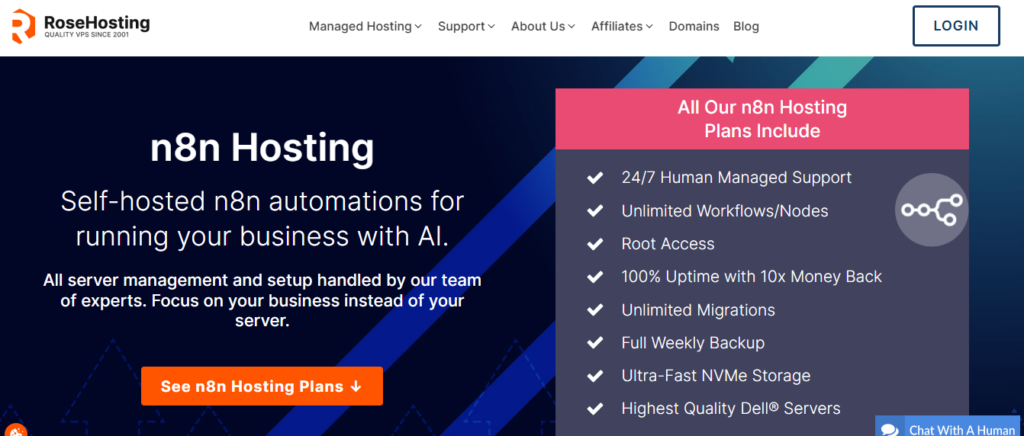
It is known as the best-managed server hosting firm, offering enterprise-level solutions to customers worldwide. It offers WordPress hosting, dedicated servers, Linux-based VPS hosting, and commercial website hosting. It will provide fully managed services, unlike less expensive hosting solutions.
Key feature
Now, let’s dive into the key features of Rosehosting:
- Fully Managed n8n environment: Rosehosting’s complete server management is its biggest feature. It includes easy n8n installation, server setup, and configuration with ongoing maintenance. The team at RoseHosting does the technical handling for you and saves your long hours of setup.
- High-performance infrastructure: It has an optimal level of hardware features like Intel Xeon processors and ECC RAM, which enable error correction to maintain stability. This will give you a faster workflow and smooth handling of the number of automations.
- Enterprise-level NVMe SSD effectiveness: PCIe 4.0 NVMe storage is 20 times quicker than SSD. Enterprise servers and Intel Xeon processors power it. It is a faster option for data processing, application performance, and page load times.
- 100% Uptime Guarantee: If the platform experiences any downtime, you will receive a 10x refund. It is highly reliable because they offer a refund and ensures uptime.
- Automated support system: You can simultaneously have complete control over the server and root access. They provide control and support in tandem, making it an extremely uncommon combination.
Pricing
Rosehosting gives its best n8n hosting plans, it has fixed pricing, no price change at renewal, and it is running 10% OFF discount on all plans:
| Plans | Pricing | Best Use |
| NVME 2 VPS | $43.99/mo | 2 GB DDR5 ECC RAM/ 50 GB PCIe4 NVMe Disk/ Free Control Panel |
| NVME 4 VPS | $64.99/mo | 4 GB DDR5 ECC RAM/ 80 GB PCIe4 NVMe Disk./ Free Control Panel |
| NVME 12 VPS | $129.99/mo | 12 GB DDR5 ECC RAM/ 160 GB PCIe4 NVMe Disk/ Free control panel |
7. Hetzner
It is a Germany-based cloud hosting provider known for its affordable VPS and cloud servers. It is especially popular in offering cloud services that are virtually scalable for servers. It supports dedicated servers, providing full hardware to ensure optimal performance. It is an optimal choice for backup and storage solutions, supporting large workloads.
It includes prebuilt applications such as WordPress, Nextcloud, and Docker. Works with a wide range of tools, including load balancers, floating IPs, and private networks. It is user-friendly, making n8n hosting affordable and worthwhile.
Key feature
Hetzner has some of the key features, like:
- Transparency in pricing: It is a highly flexible platform with pricing kept transparent for you. They use an hourly billing model, and you pay only for what you use. There are no long-term contracts, and it is more cost-effective than AWS/ DigitalOcean.
- Better performance: This platform has been powered by the AMD EPYC and ARM ( Ampere). Uses NVMe storage for better storage space, with fast reading and writing speed. Their dedicated and shared CPU options will help you manage your workload.
- Networking features: Working on the private networks and securing the server-to-server communication easily. Hetzner has floating IPs, as you can easily switch IPs between different servers in a minute. It is useful for scaling applications and Kubernetes-based microservices.
- Security system: It provides free DDoS protection through its advanced hardware services. They also work on SSH authentication to ensure secure, safe user login. This feature is well-suited for developing applications and handling sensitive data.
- Scalable storage solutions: You can easily block storage volumes up to 10TB per volume. You can easily take the snapshots along with the automated backups, contributing to the smooth workflow.
Pricing
Let’s figure out Hetzner’s pricing plans and get a clear vision of them:
| Plans | Pricing | Best Use |
| Cost Optimized | $3.15 to $3.50/mo | 4GB RAM/ 30GB SSD Storage/ Low CPU Usage |
| Regular Performance | $4.49/mo | 8GB RAM/ 240GB SSD Storage/ Low to Medium CPU Usage |
| General Purpose | $13.00 – $13.80/mo | 64GB RAM/ 360GB SSD Storage/ High CPU Usage |
The Great Migration to Self-Hosted n8n
Many people are shifting to n8n cloud alternatives due to rising operational costs. Most users are moving away from fully managed tools and adopting self-hosted n8n.
But why is this migration happening??
The shift is happening because of n8n’s per execution pricing model, where the cost eventually increases with higher usage. For all the kinds of businesses that are running, handling large volumes of workloads, self-hosting becomes a really cost-effective, practical, and scalable option. It allows unlimited workflow without the tension of worrying about the execution bill.
This transition also aligns with how automation itself has evolved. By 2026, workflows will no longer be simple, linear processes. They are intelligent, layered systems powered by AI. These “chatty” AI workflows run multiple loops, perform memory checks, and perform continuously to deliver accurate outcomes. Each of these steps represents progress but on managed platforms, they also represent cost. Over time, this creates a disconnect between innovation and affordability.
Many companies unintentionally go to inexpensive shared web hosting in order to avoid these skyrocketing costs. However, high-performance Node.js environments are necessary for n8n and AI tools. Memory surges on shared servers frequently “kill” these processes, resulting in missing webhooks, broken workflows, and unstable automation that eventually damages the company’s efficiency and reputation.
In the year 2026, tools like n8n are being introduced as they require an unlimited environment that is simple and easy to understand. So this is where the specialized kind of VPS or cloud provider knocks on your door.
VPS or cloud provider is considered to be the “Goldilocks” for automation in 2026, as it is a perfect balance of performance and cost. You pay only a fixed cost, but you still get a strong kind of performance for automation. You can access full control. VPS/cloud servers are designed in a way that always works on heavy workloads and provides a stable execution for the same. They provide easy scalability, and it is built for continuous kinds of automation.
The 2026 Profitability Equation: n8n Cloud vs. Self-Hosting
In 2026, there will be intense competition between n8n cloud and self-hosting practices in terms of profitability. The n8n cloud offers greater simplicity and quick setup, but per-execution billing can become expensive depending on your workflow scale. On the other hand, self-hosting gives you full control at a fixed server price, making it a smarter option for high-volume workflows.
In simple terms, the debate around n8n hosting VPS vs. cloud is closely related to choosing between self-hosting and managed services, where each option offers different levels of control, cost, and scalability.
To understand the difference, let’s refer to this table.
| Factors | N8n Cloud (n8n GmbH) | Self Hosting |
| Pricing Model | Pay per execution | Fixed monthly server cost |
| Setup | Very easy (No technical skills) | Requires basic setup |
| Control | Limited control | Full control over the system |
| Scalability | Cost increases with usage | Easily scalable & server upgrade |
| Customization | Limited | Highly flexible |
| Best for | Beginners & low usage | Businesses & high-volume users |
The “Execution Trap”: Why Managed Costs Spiral
What is this “Execution Trap”?? Most of the teams working fall into the execution trap as the managed automation tools look cheap at first, but the moment your workflow starts growing, the bill will also climb to its height. With every additional task or new workflow, it will increase your monthly cost. This is what people say “success rate”, meaning the more successful your automations become, the more you will have to pay to keep them running.
The managed platforms charge you for every execution and push you to take up the higher-paying plans, which instantly takes over your profit.
It starts feeling heavy, paying so much and getting nothing in terms of profit.
So, this is where n8n self-hosting becomes your safe spot. You just have to pay one simple VPS cost and easily run an unlimited workflow with no extra charges. Beyond VPS, tools like RDP hosting also offer a fixed-cost environment where you can run n8n continuously without any execution-based charges eating into your budget. Your costs will stay grounded, your automations can scale freely and with every increase in your workflow, the profit will also increase instead of your bill.
How Does “The Cloud Reality” Impact Your Monthly Budget?
Now using the cloud-based n8n, your monthly budget is not going to be fixed. It will change as you use it, and this is where the impact will fall in.
It can easily impact your monthly budget as costs increase with use, and your workflow will grow, followed by the number of executions. So significantly, your bill will rise, and it will be tough for you to maintain any fixed amount. Sometimes something starts as an affordable option, but later can become expensive when it comes to a large-scale automation workflow.
Why is the “VPS Advantage” the Ultimate Financial Sanctuary?
Now, here comes the VPS or the Virtual Private Server, which can be called a financial sanctuary for n8n users because it will give you predictable, controlled costs, which sometimes the cloud pricing also fails to do.
You do not want to pay per execution, where costs keep rising, so using a VPS with a fixed monthly price and unlimited workflow automations works best. It means you can easily and freely automate without even worrying about your bill. Stability is important; therefore, VPS acts as a safeguard against the “execution trap,” making automation stress-free and cost-efficient.
Beyond the Cloud: Reclaiming Feature Sovereignty with Self-Hosted n8n
When you go beyond the cloud and self-host n8n, you take back full control. On cloud plans, some features are limited or locked, and you only get them on higher plans. But when you switch to self-hosting n8n, everything is open, better, and under your full control. You will decide how it will run, which features to use, and how much you need to scale.
In simple terms, it means you are the owner, not the renter, of your hosting. You easily get the freedom to use everything, customize anything, and grow without any limits.
How Does “Local AI Orchestration” Transform Data Privacy?
Local AI orchestration enhances your data privacy by keeping sensitive information on your system rather than sending it to the cloud when AI runs locally, such as on your laptop, a server, or a private VPS. Then your data never leaves the space. This simply means there is no external storage, no third-party access, and no risk that your information will be used on someone else’s platform.
It gives you full control over your data processing, allowing you to choose what stays private and what is deleted, since everything is managed within your infrastructure. You can easily prevent cloud-based issues such as data leaks and unauthorized access.
Local AI orchestration helps you store your data in a secure, private vault, with only you holding the key.
Are Managed Clouds Restricting Your “Deep Customization”?
Yes, managed cloud often limits deep customization. Because everything is running on your platform, you can only customize what it allows. Managed clouds give you limited settings, extensions, and only their approved plugins. If you want to perform system-level tasks, install anything, or run advanced integrations, it becomes difficult.
Managed clouds are designed for your convenience in your work, not for your freedom.
We have given below a table form in terms of the differences in features in n8n cloud, self-hosting (VPS), and the desktop app so that you can understand clearly.
| Feature | n8n Cloud | Self-Hosted (VPS) | Desktop App |
| Setup Ease | Easiest- click and go, no server setup | Moderate- it needs a basic VPS setup and installation | Easy to install and run locally |
| Cost | Highest- Monthly pricing+ execution limits | Low– fixed VPS cost and unlimited usage | Free but not suited for heavy or 24-hour use automation tasks |
| Privacy | Data processed on the cloud servers | High privacy, as all your data stays on your private server | Highest privacy, everything will stay on your machine |
| Reliability | Very reliable with managed infrastructure | Highly reliable if the VPS is well- configured | Least reliable for long hours of running workflow (depends on laptop uptime) |
The 2026 Hardware Blueprint—What n8n Actually Needs to Run
Below is a simple breakdown of the 2026 hardware blueprint for modern automation tools like n8n, along with the requirements to run it smoothly.
- CPU (Processor)
- Minimum: 1 vCPU for a small VPS/ or for a basic laptop. It is good for lightweight automation tasks. It is useful to schedule multiple workflows to process a large number of datasets.
- Recommended: 2-4 vCPUs. It is better suited to concurrent workflows and heavier tools.
- RAM (Memory)
- Minimum: 1-2 GB. It is suitable for beginners and for basic use.
- Recommended: 4-8 GB. This will deliver you a smooth performance.
- Team: 8-16 GB usage. It is best for large teams working on complicated automation.
- Storage (Disk)
- Minimum: 20 GB SSD.
- Recommended: 40-80 GB SSD. It will allow you to use logs, caching, and snapshots without the risk of filling up.
- Database: n8n will need a database in order to store the workflow and different types of executions.
- Small/Lite: SQLite is a good option for low traffic and simple setups.
- Growth: Use PostgreSQL for better performance and safer scaling.
- Optional: Redis is for caching, sometimes not required.
- Network: You will need a stable internet connection for the API calls and different integrations like Google, Stack, and Notion.
- SSL/HTTPS: It is required if you expose n8n to the internet.
Why Is “RAM Is King” the Golden Rule for 2026?
“RAM as King” is considered a golden rule for choosing the n8n hosting provider, because it is a very heavy tool, and your workflow runs in the memory. If the RAM is low, then the workflow will also slow down or crash. It does not matter how good your CPU is if the RAM is low; then it is going to hamper the workflow. So for 2026, the golden rule is choosing the RAM first.
Better RAM will give a better or smoother workflow, resulting in fewer errors and better scaling. If you are beginners then using 2-4 GB that works for most of the setups would be a better option to start your automation and make it grow.
The NVMe Advantage: Can Your Storage Keep Up with Your Webhooks?
In the running times, NVMe could be the biggest advantage for tools like n8n, as the webhooks generally fire in real-time and require instant response. So if your storage is going to be low, then the execution will lag, and the workflow will start backing up. NVME tends to keep the process responsive and fast, so the automations are made on time.
Just imagine, like your webhooks are fast, but along with that, your storage should also be fast. So NVMe makes it easy and better, as the reading of the data happens instantly, which offers better execution and performance. If your storage is not better, then complete automation will slow down.
Connectivity & Latency: Does Data Center, Location Matter?
In 2026, the data center does matter for n8n, because the closer your server is to you, or for your services, the lower the latency, which means that there will be faster webhook responses, along with smooth execution. If the server is far, then no matter how good your automation is, it will still become slow.
Think of the latency factor as distance in conversations; the farther it travels, the longer it will take to respond. So selecting the right nearby data center is important as it keeps your automation fast and reliable.
Step-by-Step: How to setup n8n on your VPS
Now let’s find out what the important and required steps are that you need to follow while choosing your provider:
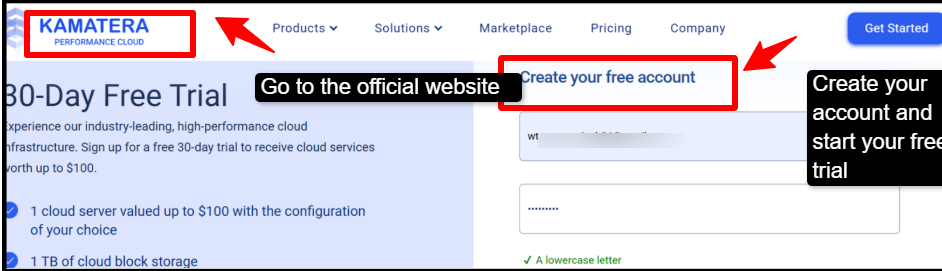
- Step 1: Go to the official website of Kamatera >> click Sign up>> enter your details and verify your email.
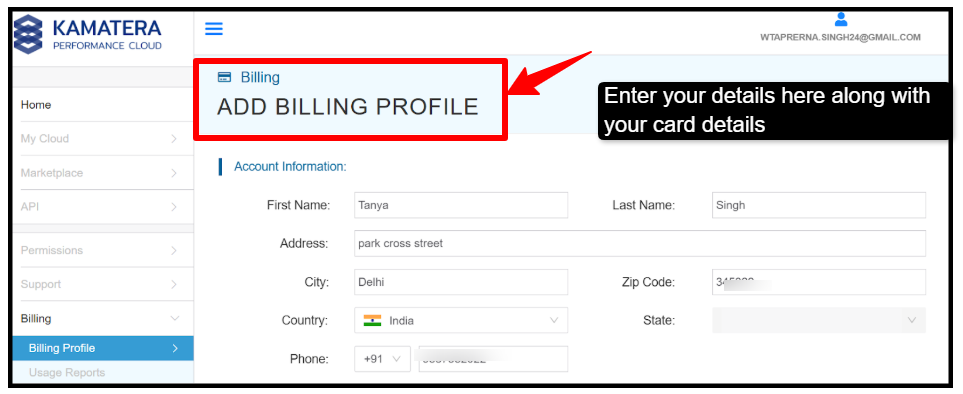
- Step 2: Add card details >> free trial may apply.
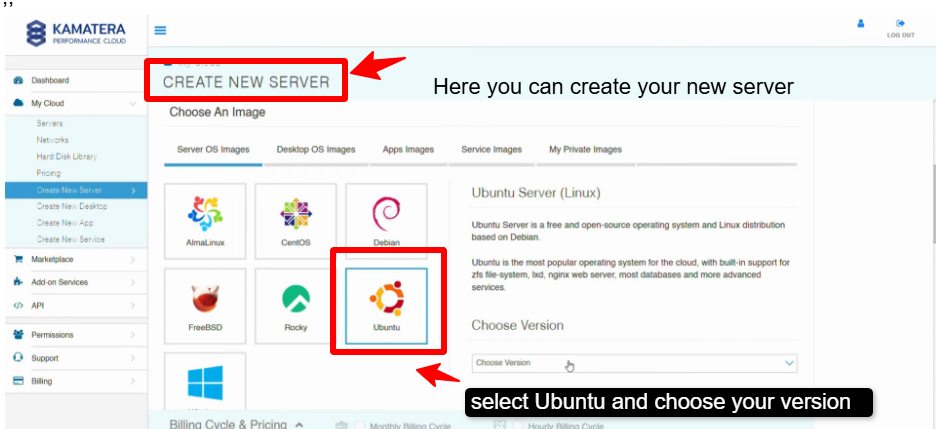
- Step 3: Click on create new server >> choose the zone that is closest to you (Asia/Middle East). Choose the OS; you can select Ubuntu 22.04 LTS (recommended)
- Step 4: Here, you need to configure your server, like selecting the CPU, RAM, Storage, and Public IP, give your server a name, and create it.
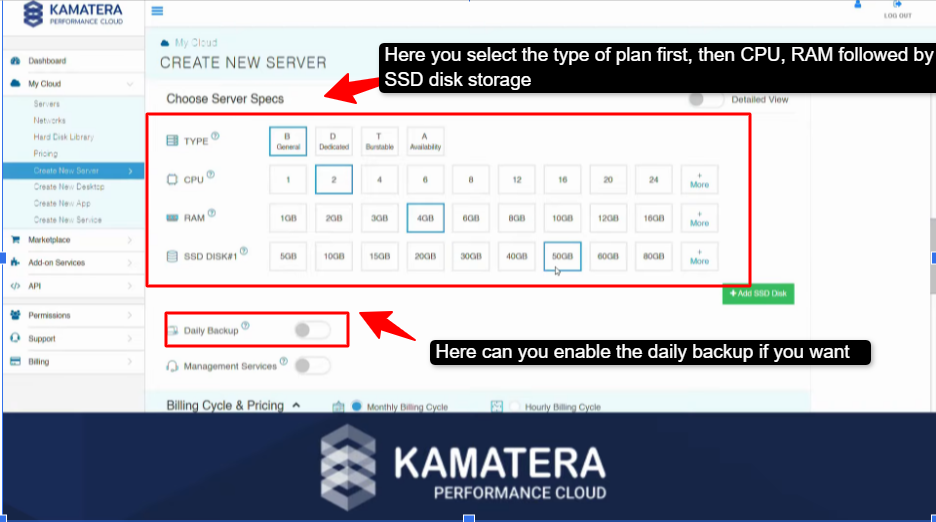
- Step 5: After the deployment, create your server IP and enter your password.
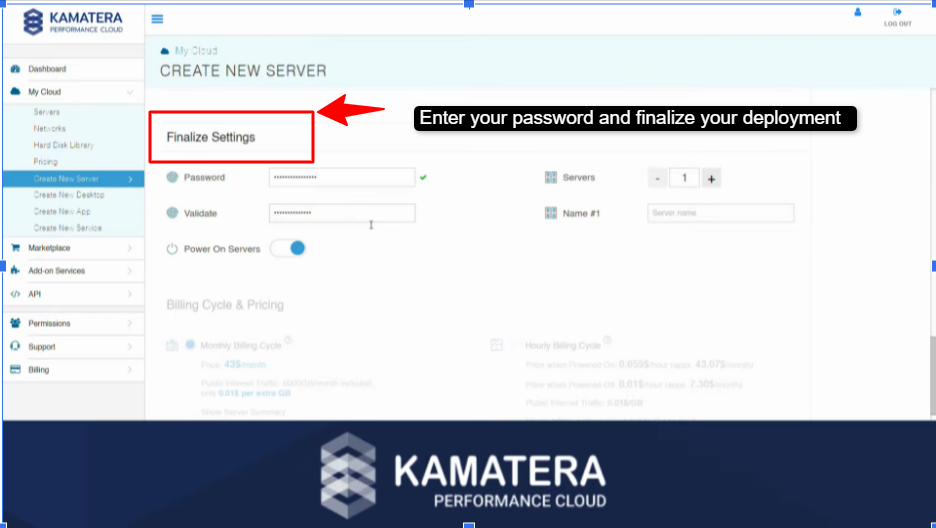
By following these many steps above, you will successfully deploy the n8n on Kamatera and set up a powerful, self-hosted automation environment. You will now have full control over your workflow, data, and server configuration without the limitations of the managed platforms.
As your needs will grow, you can easily scale your server and further customize it to match your automation goals. If you are a beginner or an advanced user, this setup will give you the flexibility, reliability, and high performance that is needed to run an efficient workflow.
Advanced n8n Configuration: Performance Tuning for High-Scale Automation
The advanced n8n configuration in terms of performance tuning for high-scale automation simply means that you optimize your n8n setup so it can easily handle thousands of different workflows, like heavy data processing, without even slowing down the overall performance.
Instead of working everything in a go, you can switch to their queue mode using Redis, and add some workers for the parallel level of execution. Just use PostgreSQL, which will benefit you with better performance, and you can also reduce heavy load by switching off the unnecessary execution logs. So, before working with this setup, it is important to understand the n8n queue mode server requirements, as it needs additional resources
When combined with robust server resources and tools such as Docker, n8n setup and performance optimization will proceed quickly, delivering a scalable system that can easily handle heavy automation loads.
Conclusion & Future Outlook
Let’s be honest, choosing the right n8n workflow automation hosting provider in 2026 can feel a bit overwhelming at first, but once you know what you need, it becomes much simpler. The right n8n hosting provider comes down to your priority- whether you want affordability, ease of use, or full control. From the beginner-friendly options, like Hostinger, to flexible platforms like Kamatera and developer options like DigitalOcean, each provider will offer you something unique.
If you require zero maintenance and easy use, managed platforms like XCloud or n8n Cloud are an optimal choice. At the same time, the VPS providers like Hostinger will provide you with better control, along with cost efficiency.
The future of n8n hosting is clearly moving at high speed, towards better control and flexibility, with self-hosted and VPS solutions becoming very popular. As the need for automation grows, users will look for cost-effective and scalable setups.
Further Readings
Frequently Asked Questions
Do I need to be a coder to self-host?
No, you don’t need to be a coder to self-host, as there are many self-hosting tools like the n8n or different applications on servers that do not require programming knowledge, but you should know the basic technical skills. You should know basic server setup, running Docker, and basic troubleshooting techniques.
Is n8n truly free to self-host for business use?
Yes, n8n is completely free to self-host for business use, but with some limits. The self-hosted version of n8n is a sustainable option, as you can use it easily inside your business for free. You can make an unlimited number of workflows, automating CRM with no license at all.
Can I migrate from n8n Cloud to a self-hosted VPS later?
Yes, you can easily migrate to a self-hosted VPS later when you want long-term cost savings along with full and better control. You just export your credentials and workflow from the n8n cloud, then set the n8n on your VPS, and then you can import anything.
Is self-hosted n8n secure enough for sensitive customer data?
Yes, self-hosted n8n is very much secure for sensitive data, but you have to do the setting right. Give proper authentication, firewall rules, and secure your credentials storage. You should also restrict access, unnecessary backups, and do not expose it publicly without any protection.
Can I install self-hosted n8n on my existing RDP?
Yes, you can install a self-hosted n8n on your existing RDP, as long as it will meet a few basic requirements, like Admin access, Minimum 2GB RAM, decent CPU (1-2 cores minimum), and a supported OS. You also need to install Docker or Node.js, which is required to run n8n. There should be background process support as n8n must run 24/7 without any interruption.





4 Comments