

Quick Summary: Free RDP is useful for a short period of learning, testing, and temporary tasks through legitimate cloud free tiers. But it often has weak performance and security issues, especially on “unlimited free” sites.
Paid RDP is the better choice when your work depends on stable uptime, stronger resources, and continuous access.
Free RDP sounds attractive because you can access a remote Windows desktop without paying anything.
But “free” does not always mean safe or reliable for regular work.
Free RDP services come with serious limitations, including slow performance, short session times, shared resources, and weak security. You may also face unexpected disconnections at times.
On the other hand, paid RDP plans usually offer better speed and dedicated resources with stronger security. You get good technical support with stable uptime.
But is paying always necessary?
The answer depends on how you plan to use the remote desktop. In this guide, we compare free RDP and paid RDP, covering their features, performance, and value.
Here, you will learn whether a free RDP is worth trying or if a paid plan is the smarter choice.
- What Does “Free RDP” Actually Mean?
- Where You Can Actually Get Free RDP in 2026
- The Hidden Limitations of Free RDP
- Is Free RDP Safe? The Security Risks
- Free RDP vs Paid RDP: Side-by-Side Comparison
- What Paid RDP Gives You That Free Never Will
- When Free RDP Is Actually Fine
- When You Should Pay for RDP
- Is Free RDP Worth It? The Honest Verdict
- Frequently Asked Questions
- Conclusion: Free RDP vs. Paid RDP—Which Should You Choose?
What Does “Free RDP” Actually Mean?
Free RDP refers to remote desktop access that lets you connect to a Windows server without paying a regular subscription fee.
It may seem like an easy way to use remote software, host a website, test applications, or access files from anywhere. But not every free RDP service works in the same way.
Some free options are provided legally by trusted cloud companies through free tiers, credits, or limited-time trials.
These plans usually restrict storage, RAM, processing power, usage hours, and account duration.
Other websites advertise “unlimited free RDP” with zero payment or verification. Such offers are often unreliable and may create serious activity and privacy risks.
Legitimate Free Options: Free Tiers and Trials.
Legitimate free RDP options generally come from established cloud providers. They may offer a free virtual server for a limited period or provide promotional credits to new users.
You can install Windows and enable remote desktop access, but you are responsible for configuring the server correctly.
These options are useful for learning, testing software, and short-term projects, but they may require payment verification, and exceeding the free limit can result in charges.
Unlimited free RDP sites are risky.
Websites offering unlimited free RDP may use shared or poorly secured servers. They can expose you to slow performance, malware, or privacy-related issues.
There could be sudden account suspensions too. So, you should avoid storing sensitive files or entering personal details on unknown RDP servers. A trusted provider will always be a safer choice.
In short, free RDP can be useful for learning or short-term tasks, but it often comes with limits and security risks. Legitimate cloud trials are safer, while unknown unlimited RDP sites should be avoided.
Where You Can Actually Get Free RDP in 2026
Free RDP is mainly available through provider promotions, cloud free tiers, and short-term trials. Before signing up, check the provider’s limits, terms, privacy policy, and renewal pricing.
RDPHostings
RDPHostings advertises free RDP servers with no requirement for a credit card from users. Its website lists features like full administrator access and instant activation with SSD storage.
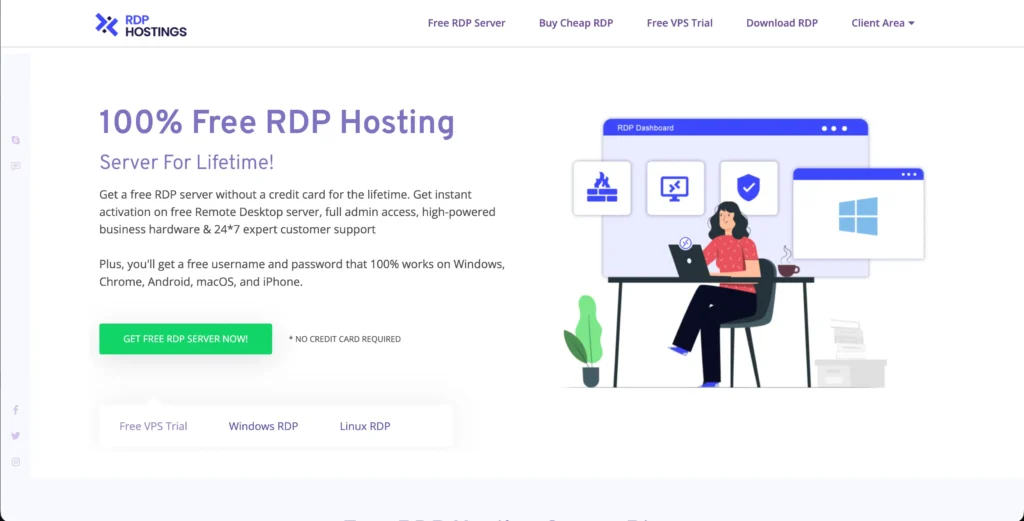
You get multiple operating systems, along with support for Windows and Linux. It even promotes free server plans and a 30-day VPS trial that is worth up to $100 in their premium plans.
But in their listed plans, some mention shared access, delayed activation, or different resource limits.
You should read the plan details carefully and confirm the exact resources, usage rules, and renewal terms before using the service.
Provider Free Trials (Short-Term)
Some RDP providers offer short-term trials or cloud credits instead of permanent free access.
These trials may last for a few days or 30 days and can be useful for testing software, learning server administration, or completing a temporary project.
So, always monitor your usage because exceeding the included credit may lead to charges.
There is no legitimate provider that can guarantee unlimited, high-performance RDP for free forever without giving you any restrictions.
Many free offers may be promotional, shared, resource-limited, or subject to approval. You should treat lifetime-free claims carefully, verify the provider’s terms, and never use an unknown server for sensitive files or accounts.
The Hidden Limitations of Free RDP
A free RDP looks like a bargain until a session drops mid-task, but the service often comes with restrictions that are not very obvious at signup.
All of these limits can affect your speed, connection time, and overall reliability. Let us see some of the hidden limitations that you may run into with a free RDP.
Credit Systems That Punish Sustained Use
Many cloud platforms offer credits instead of unlimited remote desktop access. The balance may reduce while the server runs, stores data, or transfers files.
Once the credits or monthly quota are used, the server may stop or start generating charges under a pay-as-you-go plan.
AWS states in its free tier terms that free plan users are not charged when they exceed free usage limits. Instead, AWS uses remaining free-tier credits.
When the credits finish, users must upgrade to a paid plan to keep using AWS. On the paid plan, extra usage is charged at normal AWS rates, so users should track their credits and set billing alerts.
Session Timeouts and Auto-Disconnects
Free RDP accounts may disconnect inactive sessions or stop the server after a specific period. There are maintenance and inactivity rules that can easily interrupt your work.
Some providers even limit daily or monthly running hours to control costs. All of these interruptions can be very frustrating when downloads and long-running tasks are still active.
These rules help providers control infrastructure costs and can also interrupt downloads, software testing, or even long-running tasks.
Before choosing, you always need to check if your service supports continuous uptime before using it for important work, and also save your work regularly because an automatic shutdown happening anytime may cause data loss.
Weak Specs and CPU Throttling
Trial servers generally include limited RAM, fewer CPU cores, small storage, and restricted bandwidth. Shared systems may also reduce processing power when usage becomes high.
As a result, applications can load slowly, websites may lag, and multitasking may become difficult. Providers may even reduce CPU usage when a machine consumes too many resources.
You may even notice slow application loading, screen lag, and delayed file transfers. Such hardware is generally suitable for browsing and simple tasks, but not for heavy software.
ID Verification and Card Requirements
A free trial may still ask for your phone number, personal details, or a debit or credit card. These checks help providers prevent fake registrations and automated abuse.
Microsoft A zure says that it uses phone and card details for identity verification and may place a temporary verification hold.
Some services may also upgrade accounts to paid billing after the trial unless you cancel or remain within the free plan’s restrictions.
No Real Support
Users on the free plan often receive limited technical assistance compared with paying users. Support may be restricted to knowledge-base articles, email replies, or community forums with no guaranteed response time.
If the server becomes unavailable, the account is suspended, or the RDP connection fails, solving the issue can take much longer.
Paid plans usually offer priority support, clear service terms, and better assistance when technical problems affect your work.
When it comes to short-term testing or learning, limited support may not be a serious problem. But regular users can easily face frustration when connection issues or server errors take too long to resolve.
If you need stable performance, stronger resources, and reliable assistance, choosing a paid RDP plan is better and more useful.
Is Free RDP Safe? The Security Risks
Free RDP is not automatically unsafe, but its security depends on the provider, server configuration, and how you use it.
Unknown websites offering unlimited access can create serious risks because you may not know who controls the server or the purpose behind the server.
You should use only a trusted provider, avoid sensitive accounts, and never assume that a free server offers the same protection as a paid service. Here are some of the security risks for you to understand.
Data Breaches
Malware on Shady Sites
Credential Theft
Personal-Use Licensing Traps
Free services may work for basic testing, but they are not suitable for sensitive or important tasks.
If you want better security and performance along with reliable support, a trusted paid RDP plan is usually a better and safer option.
Free RDP vs Paid RDP: Side-by-Side Comparison
Both free and paid RDP servers can provide remote Windows access, but they are designed for different needs.
Free plans may work for learning and short-term testing, while paid plans usually offer stronger performance, better security, and more reliable service for regular work.
| Feature | Free RDP | Paid RDP |
| Uptime | May stop, disconnect, or become unavailable without notice. | It offers better uptime, and some providers include an SLA. |
| Security | Security quality varies; unknown services may expose data or credentials. | Better security tools, updates, and firewalls are more common. MFA and restricted access are still recommended. |
| Specifications | Limited CPU, RAM, storage, and bandwidth. | More powerful resources, with upgrade options. |
| Dedicated IP | Often shared, temporary, or unavailable. | Dedicated IP is commonly available, depending on the plan. |
| Session limits | May include time limits, inactivity disconnects, or monthly quotas. | Usually supports longer or continuous sessions. |
| Support | Limited to basic documentation, email, or community help. | Faster technical support through tickets, live chat, or managed assistance. |
| Commercial use | Restricted to personal learning or testing. | More suitable for business use, but Windows and RDS licensing terms must be checked. |
| Cost | There is no regular fee, but trials may require verification or have usage limits. | Requires monthly or hourly payment, but offers more reliable resources and features. |
Free RDP is a sensible choice for students, quick software testing, and low-risk temporary tasks. Paid RDP is the better choice when you need it for trading, automation, or your business apps.
Always choose as per your requirements, security needs, and session duration; don’t choose on price alone.
What Paid RDP Gives You That Free Never Will
A paid RDP plan gives you reliability and resources that free plans cannot. It usually offers better reliability and stronger resources.
All these benefits matter a lot when you run business software, multiple applications, automation tools, or other workloads that need to stay online.
Here are some important reasons why a paid RDP is much different than the free one.
Guaranteed Uptime and Reserved Resources
Paid RDP plans often include an uptime target or SLA, while free services may stop or disconnect without giving you any warnings.
You also receive a fixed amount of RAM, CPU, storage, and bandwidth for your account. Reserved resources reduce slowdown caused by overcrowded servers and help demanding applications run more consistently.
Always check if the provider offers dedicated or shared CPU and read the exact uptime terms before making your final purchase.
Full Admin Access and a Dedicated IP
Most of the paid RDP services offer administrator access, allowing you to install software, change settings, and configure security tools.
A dedicated IP can easily make remote access more stable and is useful for allowlisting, business tools, and applications that require a consistent address.
But still confirm that the IP is truly dedicated and that administrator access is included in the plan rather than offered as an extra feature.
Real Support and Commercial Licensing
Paid users generally receive faster support through tickets, live chat, or other direct channels. This can be important when your server goes offline or any of your applications stop at any time.
All the reputable providers clearly explain their Windows licensing and permitted commercial use. You need to read their terms carefully.
Microsoft states that Windows Server remote desktop services may require RDS Client Access Licenses for each user or device.
For occasional use, a free option may be enough, but when it comes to your business work, heavy applications, or 24/7 automation, then paid RDP plans offer better reliability and control that free services usually cannot match.
Always compare resources, uptime terms, and IP type along with support quality before choosing any plan.
When Free RDP Is Actually Fine
Although not every workload can run smoothly with a free RDP, it could be a practical choice when your needs are temporary, low-risk, and lightweight.
There are trusted cloud trials and free tiers that can help you easily learn remote desktop management without paying immediately. Here are the reasons why free RDP can work fine.
So, remember not to use free RDP for banking, confidential documents, or your business accounts. Always keep backups, monitor your limits so that you don’t exceed them unnecessarily, and shut down the server the moment you’re finished to avoid any of the unexpected charges.
When You Should Pay for RDP
Going for a paid RDP becomes much more sensible when you have to complete tasks other than basic testing, or you want to take forward a long-term project.
A paid plan gives you more reliable sources and better control. Here are certain criteria, so consider switching to paid RDP if any of these apply.
If a short outage only causes inconvenience, a free trial may still work.
But if downtime can interrupt your clients, stop automation, or affect your business, paying for reliable RDP is the safer decision.
Is Free RDP Worth It? The Honest Verdict
Yes, it is worth it, but only for simple, temporary, and low-risk tasks. It can help students learn server management or complete a quick project without an upfront cost.
But free plans usually include limits on credits, speed, uptime, storage, and support.
Free RDP is suitable for:
Note: CISA recommends strong authentication for remote desktop access, especially when administrative access is involved.
In short, free RDP saves money, but paid RDP delivers the reliability needed for serious and long-term work.
The honest verdict is simple: free RDP is only useful as a temporary testing tool, not as a dependable long-term solution.
If you need stable performance, stronger security, and continuous uptime with real support, then paying for a reputable RDP plan is always worth the cost.
Frequently Asked Questions
Is free RDP safe to use?
It completely depends on your requirements. If you want to use RDP for basic browsing or for learning server management, then it can be used, but if you think that you can use free RDP for your confidential work or bank-related tasks, then you need to upgrade your RDP for extra security.
Can I get free RDP without a credit card?
Yes, you can get a free RDP without using a credit card.
Is there truly unlimited free RDP?
No, there is no truly unlimited, permanent, and free RDP server hosted on the cloud without any of the major catches, caps, or expiration dates.
How long do free RDP trials last?
Free RDP trials typically last between 1 and 30 days, depending on providers.
Can I use free RDP for trading or business?
No, using a free RDP for trading or business is highly discouraged because of its lack of security, reliability, and uptime guarantee.
What is the cheapest paid RDP?
The cheapest paid RDP would range between $14.99/mo, depending on the provider.
Conclusion: Free RDP vs. Paid RDP—Which Should You Choose?
Both free and paid RDPs have different pluses and minuses. The right choice depends on your workload, which decides the type of RDP you should choose. Free RDP can be very useful for students or for learning and software testing.
It comes with limited speed and limited support, so choose the free version only if your work is low-risk and temporary. But if your work is sensitive or heavy, then paid RDP is always the better option for your trading, automation, and business applications.
It generally comes with stronger performance, and it’s a more dependable service than the free one. Whichever you choose, just remember to go for a trusted provider, protect your login details always, and enable MFA wherever possible.
💡 Most Loved Article!




2 Comments