

Quick Summary: You can host your AI agents 24/7 AutoGPT, & Claude agents 24/7 so they keep running even when your computer is off. Here, we cover everything. 1) Start by setting up your always-on RDP server with admin access 2) Install your agent framework on it and connect your API key.
We have explained everything from automatic restarts, security, and performance monitoring to keep everything stable.
Imagine your digital team works day and night without breaks, powered by AI agents such as AutoGPT, CrewAI, and Claude Agents that can easily research information, manage your tasks, and monitor systems.
But keeping these agents online 24/7 requires more than simply installing a tool.
Because the LLM runs through an external API, you don’t need a heavy server: 2-4 vCPUs, 4-8GB RAM, and 60-120GB SSD storage are enough for most single-agent setups.
Running several agents together may need 8-12GB of RAM. Security matters as much; keep your API keys in environment variables, and protect RDP access with a strong password and a firewall.
If you want to automate your business tasks or run multiple agents together, here’s how you can go with a hosting setup that fits your workload.
- Why You Can’t Run AI Agents on Your Own Computer
- What You Actually Need to Host an AI Agent (Less Than You Think)
- How Much RAM Do AI Agents Really Need?
- How to Host AI Agents 24/7 (AutoGPT, & Claude Agents)
- Windows RDP vs Linux RDP: Which Should You Use for AI Agents?
- What Does It Cost to Host AI Agents 24/7?
- Common Mistakes When Hosting AI Agents
- Frequently Asked Questions
- Conclusion:
Why You Can’t Run AI Agents on Your Own Computer
If you run an AI agent on your own computer, you may think it will be very simple, but in reality it is not considered a good idea because for this you need the agent to work continuously.
That is the reason why you need to host your AI agent on a VPS or an RDP, so that it works even when your computer is switched off.
Here are some of the good reasons why your personal computer is not good:
A VPS or RDP solves all of these problems by running 24/7 in a data center, independent of your personal computer.
You get full admin access to install agents, set up your auto-start, and configure firewalls and monitoring. And as your workload grows, you can easily scale CPU and RAM without even slowing down your own computer.
What You Actually Need to Host an AI Agent (Less Than You Think)
An AI agent does not always need an expensive server. Most agents use a small RDP, a stable internet connection, and enough RAM to handle tasks, tools, and background processes.
The exact requirements depend completely on the number of agents and if the AI model runs through an API or directly on your server.
The Key Insight: The LLM Runs via API, Not on Your Server
You do not run the LLM on your own server. If you are hosting a language model then it needs powerful CPUs and a lot of RAM, which is very expensive.
Instead, you can run the LLM through an API, and AutoGPT, CrewAI, and Claude-based agents all can work this way.
In order to do this, you need an API key. You can treat it like a password, and it connects your application to the LLM.
Your agent then sends the data to the LLM through the API and receives the response, so the provider’s infrastructure does the tough job, and you don’t have to run the entire setup on your server.
Your server only manages the agent’s instructions, tool calls, schedules, and results. It can also handle tasks like browsing websites, processing files, and sending notifications. That is why a small RDP is enough, and you don’t need a powerful GPU.
You still need to keep your API key secure, maintain a stable internet connection and keep an eye on your provider’s usage limits and API charges.
RAM and CPU Requirements (4GB, 8GB, 12GB Explained)
Your server size should always match the number and complexity of your agents. Here is a simple way you can size your RDP when the AI models run through an external API.
CPU requirements
Always choose your plan based on what your agents can actually do. Start with 4-8GB RAM and 2-6 vCPUs for a single API-based agent and upgrade only when you want to add more agents, browser tasks, or file processing.
How Much RAM Do AI Agents Really Need?
Most of the API-based AI agents do not need a large amount of RAM because the language model runs through an external API. Your server mainly handles the agent framework, tools, workflows, databases, and background services.
You can refer to the table below as a simple starting point to understand it well:
| Workload | Recommended RAM | Best for |
|---|---|---|
| 4GB | 4GB | One lightweight, API-based agent, Python tools & basic automation. |
| Docker + database | 8GB | One agent with Docker, PostgreSQL, Redis, a small database, and other supporting services. |
| Multiple concurrent agents | 12GB | Multiple concurrent agents, heavier databases, several tools running at the same time. |
These recommendations apply to API-based agents. A local AI model changes the requirements completely. So, for your production setup that can run all the time reliably, follow this step-by-step process.
How to Host AI Agents 24/7 (AutoGPT, & Claude Agents)
Linux RDP is a useful option when you want to host an AI agent on a remote server but still need a virtual desktop.
Before you begin, choose an RDP with enough RAM, CPU, SSD storage, and full root access. The steps below explain how to buy a Linux RDP to run your AI agents 24/7.
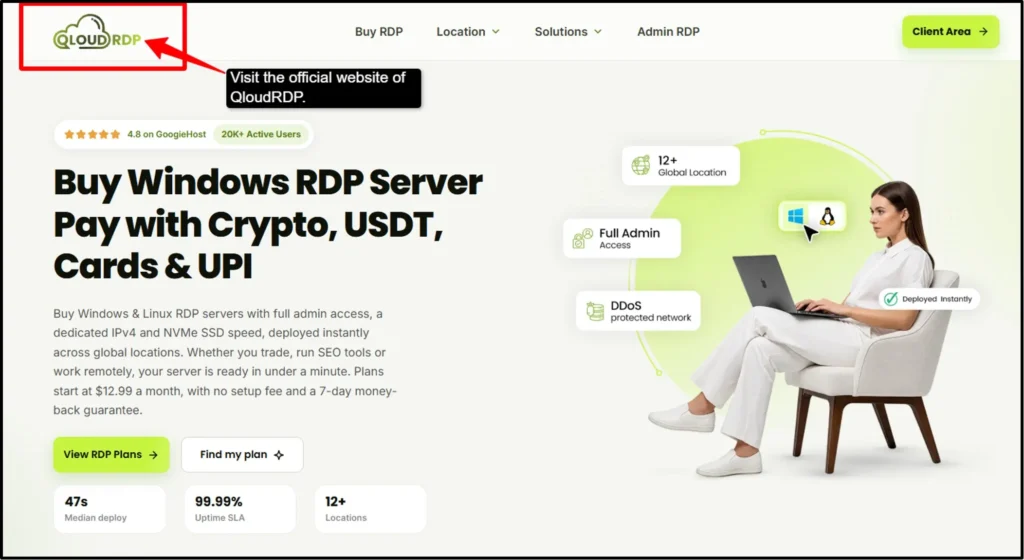
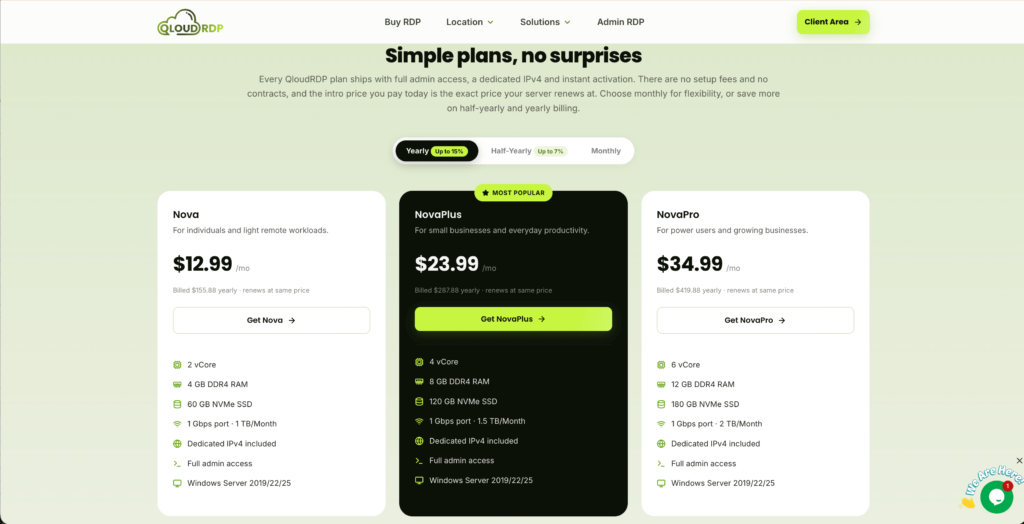
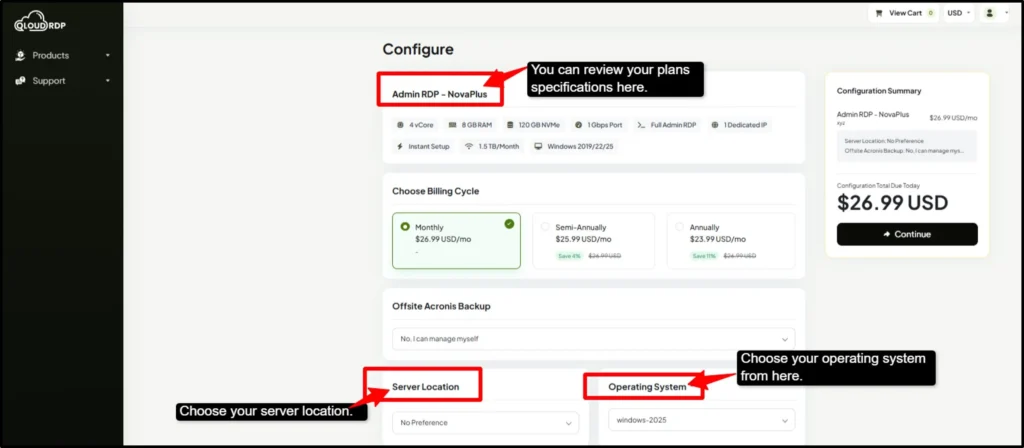
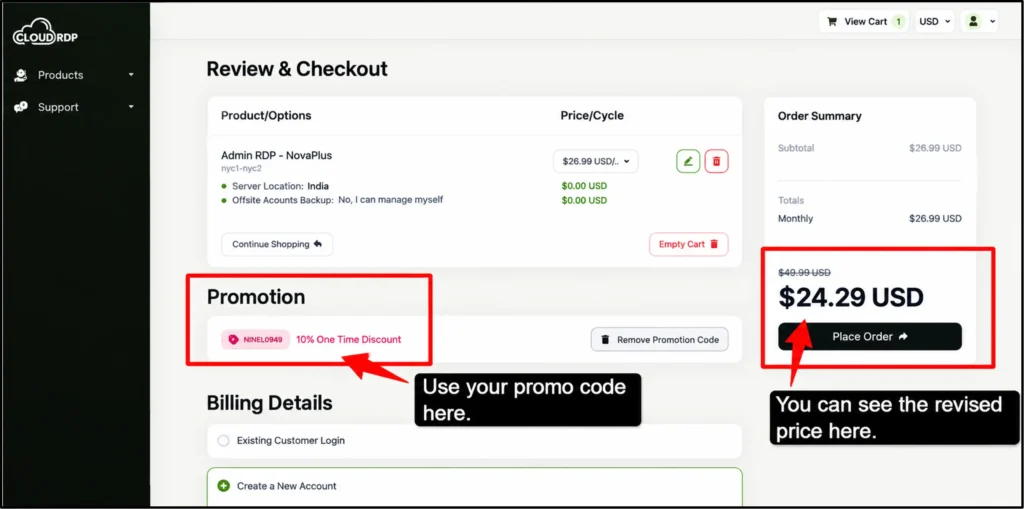
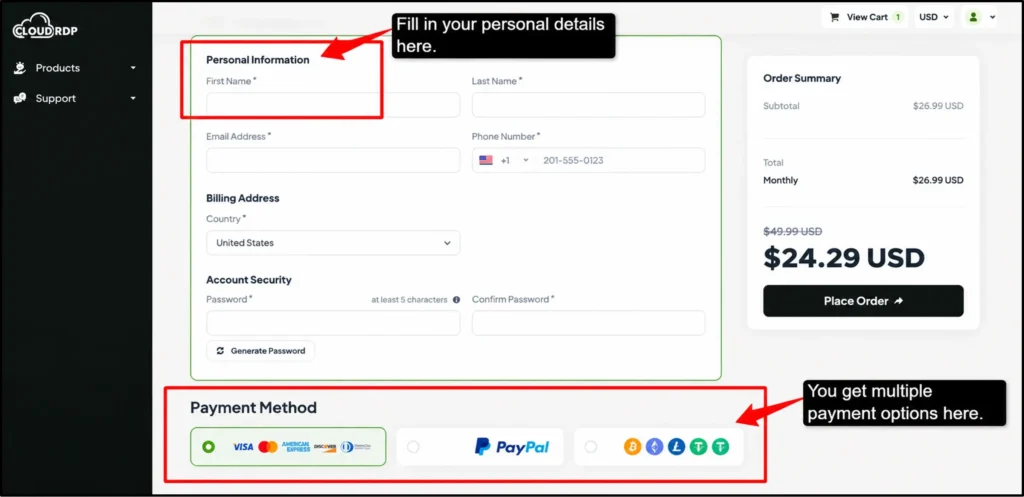
Once you complete the buying process and access your Linux RDP server, you can install your AI agent, add your required API keys, and configure its dependencies.
You can use tools such as Docker or systemd to keep your agent active after disconnections and server restarts. The RDP lets your agent monitor tasks and complete workflows 24/7, even when your personal computer is turned off.
Windows RDP vs Linux RDP: Which Should You Use for AI Agents?
Windows RDP and Linux RDP can both keep AI agents online 24/7.
Your choice depends on if you need a remote desktop or a lightweight environment for automation. Linux usually uses fewer resources, while Windows RDP offers easier access to desktop applications.
| Feature | Windows RDP | Linux RDP |
|---|---|---|
| User Interface | Easy virtual desktop access through RDP. | Mainly managed through SSH and commands. |
| Resource Usage | Higher because Windows and the desktop use more RAM. | Lower, so more resources remain for the agent. |
| Ease of Use | Windows software, visible browsers, and desktop automation. | Requires basic Linux and command-line knowledge. |
| Performance | Good, but the desktop adds extra load on RAM, since RAM is the main factor in running an AI agent. | Efficient for long-running scripts and workflows. |
| Cost | It may cost more because of the Windows license. | Often cheaper because Linux is open source. |
| Security | It needs strong RDP protection and firewall rules. | SSH keys, firewalls, and regular updates provide secure access. |
| Best for | Beginners and users who need a GUI. | Python, Node.js, Docker, APIs, and background services. |
Choose Windows RDP
Note: Keep your RDP secure with a strong password, network-level authentication, firewall rules, and regular updates. RDP access can attract automated attacks very easily when it remains open to the public internet.
Choose Linux RDP
A Linux RDP is a more practical choice for most AutoGPT, CrewAI, and Claude-based workflows. Windows RDP makes more sense when your agent depends on Windows applications or visible browser automation.
What Does It Cost to Host AI Agents 24/7?
AI agent hosting costs less than most people can think. A small RDP usually costs around 5-9.99/month, which is enough for one API-based agent or a simple automation workflow.
You usually do not need a GPU because the language model runs through an external API. The RDP only manages the agent’s instructions, tools, memory, and background tasks. You need a GPU when you run a local model with tools like Ollama or LLM.
For example, QloudRDP can be a useful option if you prefer a Windows or Linux environment for your AI agents. You can choose as per your requirements. It suits users who need browser automation, Windows software, or a virtual interface to manage their agents.
Your total monthly cost also includes:
A $12.99 RDP is a much more practical starting point for one lightweight agent. You just need to check the RAM, CPU, renewal price, uptime, and security features before choosing a plan.
Common Mistakes When Hosting AI Agents
AI agents can stop working for simple reasons. These mistakes can easily cause downtime, security problems, and unnecessary hosting costs. Here are some of the common mistakes that you can avoid:
Buying an Expensive GPU Server
The Agent Stops After Disconnection
No Automatic Restart
Exposing API Keys
Skipping Monitoring
A reliable AI agent setup does not require expensive hardware. You need to choose the right RDP, keep your agent running after disconnections by enabling automatic restarts, and protect your API keys.
These simple steps will help your agents work safely and continuously with fewer interruptions.
Frequently Asked Questions
Do I need a GPU to host AI agents?
No, you do not need a GPU to host API-based agents such as AutoGPT, CrewAI, and Claude Agents because they usually work on a normal RDP. You need a GPU only when you run the AI model locally on your own server.
How much RAM does an AI agent need?
A single lightweight agent can work with 4GB RAM, so choose 8GB for Docker and a database or 12GB for multiple agents, browser automation, and heavier workflows.
Can I run AutoGPT and CrewAI on the same server?
Yes, a 4GB RDP can handle both for light workloads. Choose 8GB if both agents run tasks at the same time or use databases and browser automation.
How do I keep an AI agent running after I disconnect?
You can use Docker with a restart policy, systemd, or screen. These tools keep the agent active after you close SSH or disconnect from RDP.
Is a Windows RDP or Linux RDP better for AI agents?
Yes, Linux RDP is better for AI agents because of lower resource usage. Choose Windows RDP when you need Windows software or a virtual desktop.
How much does it cost to host an AI agent 24/7?
A small RDP usually costs around $12.99 per month. You can add extra costs for API usage, database, backups, browser tools, or higher server response.
Conclusion:
AI agents can handle research, automation, monitoring, and repetitive tasks without constant human input. However, your personal computer may stop the agent when it sleeps, reboots, loses power, or disconnects from the internet.
A reliable Linux RDP is usually the better choice for AI agents like AutoGPT, CrewAI, and Claude agents. It uses fewer resources, supports Python, Docker, and automation tools, and keeps your agents online even when your computer is off.
You can set up automatic restarts, protect your API keys, and monitor the server regularly.
It gives your agents the stable environment they need to monitor tasks, respond to requests, and complete work throughout the day and night.
💡 Most Loved Article!



Leave a comment