

Quick Summary: Full Admin Access means you control your Windows VPS completely. You can install software, change settings and run applications without restrictions.
It is really important because without it, your server is useless. You’re blocked, waiting on support, and dependent on others. With admin access, you own your server and can solve problems instantly.
If you want to run your own server and control everything yourself without depending on anyone? A Windows VPS is exactly what you need.
A Windows VPS is a virtual private server that gives you your own powerful computer in the cloud that you can use from anywhere.
When you have a Windows VPS, you get complete freedom; you can install any software, run applications, host websites, store data, and manage everything yourself. This is very important because you own your server and can solve problems instantly and not wait for support.
Full admin access gives you complete control over your server, which means you can do anything you need.
Here, we’re going to explain everything about Windows VPS with full admin access. We’ll show you exactly what it is, why it is important for your business and how to make sure you have real control over your server.
What does “Full Admin Access” actually mean?
You must be wondering, what is a VPS with admin access? Full admin access means you can do whatever you want on your server. When you have full admin access, you are in charge, which means you can install any software you need, you can manage the firewall and security and easily perform your deep configurations whenever you need it. You can change any settings on your server.
If you don’t have admin access, it’s completely the opposite. You cannot install software. You can’t change settings. When something goes wrong, you have to call the IT support team to fix it. The system keeps blocking you from doing things. Someone else is controlling your server, not you.
So the real difference is simple: full admin access means your server is actually yours to control.
If you don’t have admin access, someone else is in control, and you’re just renting space you can’t really use the way you want.
Admin Access vs Root Access vs User Access: The Difference
Admin access lets you control most things on your computer, but it still asks for permission before making big changes, whereas root access gives you complete control, which has zero restrictions or warnings. Admin is safer to use every day, while root is more powerful.
Now that you have understood in simple terms what full admin access vs. root access is, let’s compare it with other types of access you might hear about in detail.
There are basically three different access levels you can have on a server, and they give you very different abilities.
Here’s how they stack up against each other.
| Access Type | What You Can Do | What You Can’t Do | Who Uses It |
|---|---|---|---|
| User Access | Use basic programs, view fields, create documents | Install software, change settings, modify system files, or manage security. | Regular employees, guests. |
| Admin/Administrator Access (Windows) | Install software, change settings, modify files, manage users, control the firewall, and manage Windows services. | Nothing (complete control). | Server owners, IT professionals. |
| Root Access (Linux) | Install software, modify files, manage users and control security. | You can do everything. | Server owners, system administrators. |
The big thing to notice here is that admin access on Windows and root access on Linux are basically the same thing. They give you complete control, but user access, on the other hand, is very limited.
If you’re running a Windows VPS and you want to actually control your server, you need admin access. It’s not optional if you want your server to work for you. Admin access is the only way to truly own your server.
Why Windows VPS with Full Admin Access matters?
Full admin access isn’t just a nice feature to have. It’s what actually lets you do things on your server. Without admin access, you’re sitting on a tool you cannot use at all.
But admin access makes everything possible.
For all Windows VPS users, understanding the importance of full admin access is very important.
1. Install Any Software You Want
This is a huge advantage. If you have full admin access, you can install literally any software your server needs. Like, if you want to run a database like SQL Server, just install it, or you need to use Node.js, Python or any programming language.
You can easily set it up yourself. But without admin access, you are completely stuck. You have to wait for your hosting provider to install it for you, and they might not even have what you need.
2. Configure System Settings & Services
Your server has a lot of moving parts. Services are running in the background that make things work: Windows Update services, security services, network services, and more. When you have full admin access, you can control all of this hassle-free.
You can easily turn services on or off, change how they work, and optimize everything as per your needs. You can even tweak system settings to make your server faster, more secure, or more efficient. So, full admin access gives you full access; otherwise, everything feels locked for you.
3. Run Automation, Bots & Trading Tools 24/7
If you are running any kind of automated system, like trading bots, automation scripts, scheduled tasks, or background processes, you need admin access. These tools often need to run with elevated permissions. They might need to access system resources or run services that regular users cannot touch easily.
When you have full admin access, your bots and automations run smoothly, as there are zero permission walls. So, admin access is important; otherwise, your operations can fail or be blocked constantly.
4. Manage Users, Ports & Security Yourself
You have complete control over who can access your server and how. You can even create user accounts, set different permission levels for different people, and decide exactly what they can do. You can open or close ports on your firewall, which means you control what traffic gets in and out.
You can even install security software, configure Windows Defender, set up backups, and secure your server the way you want to, not the way your host set it up.
This is the actual power. All this cannot be possible without admin access, as all of this can get locked down and you’re stuck with whatever your host decides.
Every single thing we just talked about- from software installation, system optimization, running automated tools, and managing security- none of this is possible if you don’t have full admin access.
You will be blocked at every turn. But if you have it, you can build, create, automate, and scale even without asking anyone for permission.
What happens without Full Admin Access?
If you don’t have full admin access, your server becomes useless for almost anything serious. You’re paying for power you cannot use.
Let’s look at what actually happens when you don’t have admin rights. These are not some of the small inconveniences, but they are deal breakers for anyone who is trying to run a real business or project.
- You can’t install any software:
You need to install something, but it becomes tough as the system blocks you. That database software you need, you can’t even install that, or you need a special tool for your business operations. Everything becomes so limited and restricted because permission is denied.
After this, you waste all of your time raising a ticket regarding your issue; your projects get stuck, and meanwhile all your competitors move forward, because they have full admin access.
- You can’t change system settings:
Your server is not optimized for what you need, or maybe it’s not configured rightly for your application. Anything that happens, it doesn’t matter because you cannot change anything.
You can see the settings, but every time you try to change something, your system says, ‘No,’ and you are stuck waiting for someone else to make your simple changes.
- You can’t manage the firewall or ports:
Your firewall gets locked down. If you need to open a port for your application to work, you cannot, or you need to block certain traffic, but still, you cannot do anything.
Someone else controls what gets in and out of your server. If they set it up wrong, that’s your problem completely. You are only watching with zero power to do or make any changes to your server.
- You can’t touch Windows Updates:
Updates happen on someone else’s schedule. Your hosting provider decides when your server restarts, not you. This could happen during your busiest hours or when your site goes down. Then your customers cannot reach you either, and you have zero control over when it happens.
- You can’t run bots or automation:
If you want to run trading bots, automation scripts, or background processes, forget it completely. Most of these need admin access to work, so if you’re a trader who needs to run bots every time, then without admin access nothing can happen.
With your bots or your automation, nothing will work. So, a server without any kind of control is completely useless.
It’s very simple to understand: if you don’t have full admin access, you’re paying for a server you cannot actually use. You have zero control and no independence over your server.
Every time you’re stuck waiting for replies from your provider whenever you raise any concern or ticket. This results in failed business operations, and you cannot make anything right as needed.
“Full Admin Access” Scams: What Providers Claim vs. What You Get
Does a VPS come with admin access? Many hosting companies advertise “Full Admin Access” as a premium feature, but the reality isn’t always the same. Some providers give you complete control over your Windows server, while others apply restrictions that limit what you can actually do.
Knowing the difference will help you avoid paying for a server that doesn’t meet your needs.
| What Providers Claim | What You Actually Get |
|---|---|
| Full Admin Access | You’re logged in as an admin, but many system settings are locked. |
| Install any software. | Certain apps, drivers, or services are blocked or removed. |
| Complete server control | You face critical errors in your system or network, and once you’re connected, they create hidden user accounts or change passwords to lock you out while keeping supreme control. |
| Unlimited usage | CPU, RAM, or network speed is secretly throttled when your usage increases. |
| No restrictions | The provider’s security policies prevent changes to Windows Defender Firewall or system updates. |
These are some of the major claims that many hosting providers make, but when you actually connect to them, they show you the real picture of fake claims, so you need to be very well aware before you choose your provider.
Common Tricks Some Providers Use
- They advertise administrator access but remove important Windows permissions.
- They don’t mention software restrictions until after you purchase.
- They disable Windows features needed for development or for your server management.
- They oversell servers, causing slow performance even though your plan promises dedicated resources.
- They market a shared RDP server as a Windows VPS with full admin rights.
You can verify all these factors by focusing on some of the major factors, like verifying your full admin access. Before purchasing any plan, try to go for free trials or money-back guarantee claims so that you can first test, install and check for the permission rights.
Let’s move forward and understand how.
How to verify you actually have Admin Access?
So you get your Windows VPS, and the provider says you have full admin access.
But how do you actually know if they’re telling the truth? How to check admin rights on a Windows VPS? Don’t just take their word for it; test yourself and check it.
Here’s how to check and verify that you actually have real admin access, not just a limited version they’re calling “Admin.”
1. Check Your User Account Type
The first thing you need to do is find out what type of account you actually have.
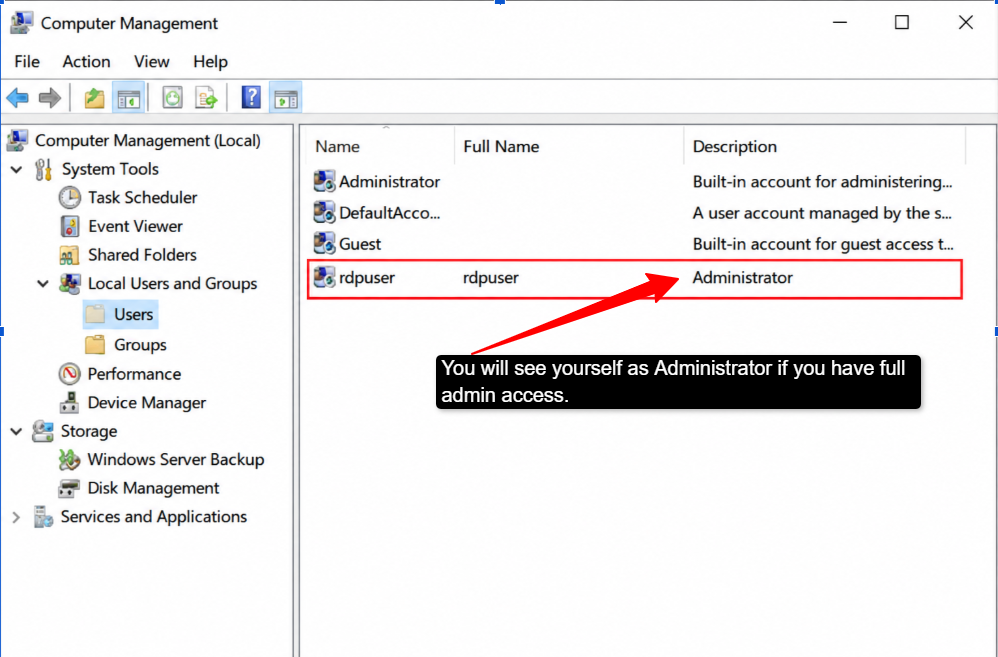
Connect to your server using Remote Desktop, then open the Start menu and search for “Computer Management” >> Select “Manage.” After this, look for “Users and Groups” >> find your account in the list.
If it says “Administrator” next to your name, then it’s great. But if it just says “User,” that is a problem, and it means you don’t have admin access. You can also check this faster, like this.
Open Command Prompt >> type: net user [your username] >> It will show you your account type. If it says “Administrator,” you are in the good direction, and if it doesn’t mention it, then it means you don’t have admin access.
Another Way
Right-click on any program >> Select “Run as administrator.” If that option is greyed out or blocked, you definitely will not have admin access, but if you have real admin rights, you can always run things as administrator.
2. Test Install & Permission Rights
Claiming to have admin access is one thing, but actually having it is another. So test it; you can try installing something. Like, you can download a simple program, maybe a text editor, a programming language, or a utility tool.
If it installs without asking for permissions or getting blocked, you have admin access, but if you get a “Permission Denied” message, you don’t.
You can even try changing a system setting. Go to the Control Panel and try to change the date and time or modify your firewall settings. You can even try to change the network settings.
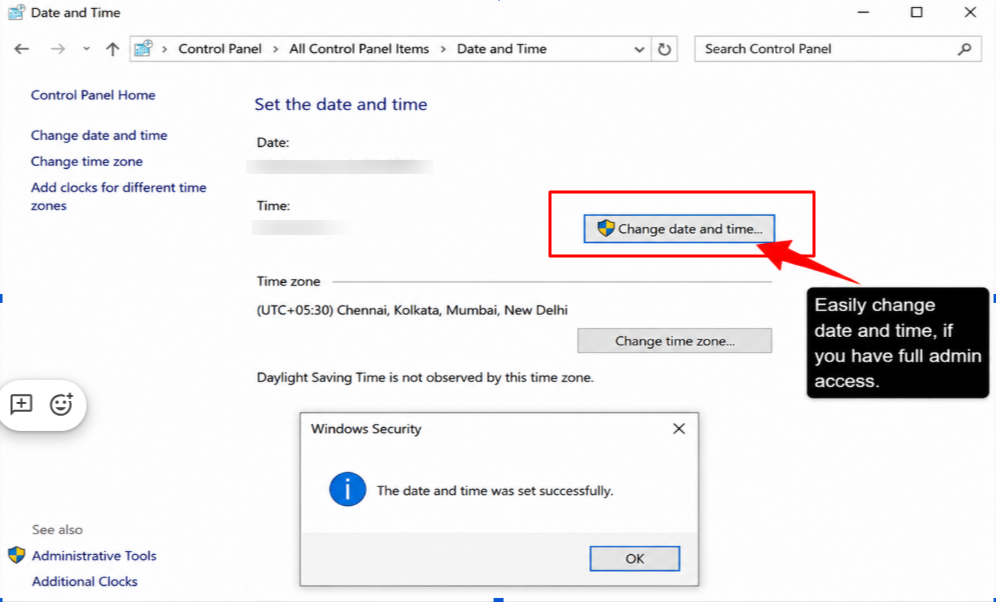
If you have real admin access, you can do this without getting blocked, but if you don’t have it, you’ll get errors every time saying you don’t have permission.
Does every Windows VPS come with Admin Access?
Yes, most of the legitimate Windows VPS full admin access providers include full admin access as a standard feature.
If you’re choosing a reputable hosting company, admin access comes with your VPS from day one. It’s not an extra charge, and it’s not a premium feature; it’s just a part of what you get with your VPS.
Key Features of Windows VPS/Administrator Access:
- Full Control: Access all server settings and configurations.
- Remote Access
- Windows VPS: Connect through RDP with full admin access (Remote Desktop Protocol)
- Linux VPS: Access using SSH (Secure Shell)
- Software Installation: Install and manage applications without restrictions.
Hosting providers know that if you’re paying for a VPS, you need to actually control it. Admin access is not optional, but it is something essential.
So good providers include it automatically. This is the standard across the industry, and any decent hosting company will give you a full administrator account when you set up your Windows VPS.
Conclusion: Why Full Admin Access is Non-Negotiable
Full admin access is not optional; it’s essential, and without it your Windows VPS is useless for you. You cannot install any software, you cannot change your settings, or you face problems running applications. You’re paying for a server that you cannot actually use.
Every time you’re dependent on your provider, or raising a ticket for every concern and then waiting for days for it to happen.
Admin access changes everything. You get complete control; you can do whatever you need, or you feel like. There is nothing like you having to seek permission for anything. Your server is completely yours.
So, when you’re looking for Windows VPS administrator privileges, make admin access non-negotiable. Providers like QloudRDP understand this, and they include full admin access as a standard on all of their plans.
That’s the kind of provider you need, so choose one that gives you real, unrestricted admin access from day one.
Your Next Read Starts Here
- Why Is My RDP Slow? 10 Proven Fixes to Stop Lag (2026)
- Best RDP with UPI Payment in India (2026): Instant, No Card Needed
- Buy Anonymous RDP with Crypto – No KYC & Instant Setup
- Windows VPS vs RDP: Are They the Same Thing? (2026 Explained)
Frequently Asked Questions (FAQs)
Is admin access the same as administrator rights?
Yes, they’re the same thing. Admin access, administrator rights, and administrator privileges, they all mean the same thing. You have an administrator account with full control, so don’t get confused by different terminologies.
Do all Windows VPS plans include full admin access
Yes, if you buy your hosting from a reputable provider, admin access comes included. But again, don’t go just by marketing claims; do check before you proceed with any provider.
Can I get root/admin access on a shared RDP?
No, and this is important to understand. A shared RDP is when multiple people use the same server. You can’t have full admin access on a shared RDP because other users are on the same server. You get limited permissions to your own space only. If you need full admin access, switch to a dedicated VPS, not a shared one.
How do I check if I have admin rights on my VPS?
Connect to your server using a remote desktop. Open the command prompt and type: net user [your username], with your actual username. If it shows “Administrator” in the results, you have admin access. Another quick test: try to install any program; if it installs without permission errors, you have admin access. If you get “Permission Denied,” you don’t have admin rights on your VPS.
Why can’t I install software on my VPS?
You might not actually have admin access; check using the method given above. Second, your provider might be blocking certain software for security reasons. You first get verified that you have admin access, then try installing any software to see if the issue is specific software or all software. Then contact your provider and ask them, “Why can’t I install software?” Ask which software has restrictions, and ask them to remove those restrictions or find a new provider.









1 Comment